Свойство CSS text-indent
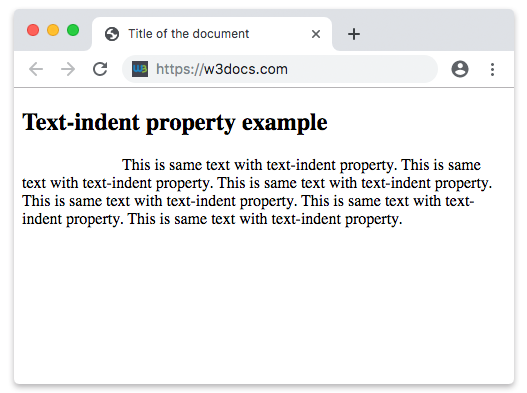
Свойство text-indent задаёт длину пустого пространства первой строки в текстовом блоке. Направление текста задаётся свойством direction. Если указано отрицательное значение, первая строка будет сдвинута влево. Свойство text-indent применяется только к первой строке текста в элементе.
WARNING
Значения "each-line" и "hanging" являются экспериментальными.
| Начальное значение | 0 |
|---|---|
| Применяется к | Блочным контейнерам. |
| Наследуется | Да. |
| Анимация | Да. Свойство text-indent анимируется. |
| Версия | CSS1 |
| Синтаксис DOM | object.style.textIndent = "100px"; |
Синтаксис
Синтаксис свойства CSS text-indent
css
text-indent: length | percentage | each-line | hanging | initial | inherit;Пример свойства text-indent:
Пример использования свойства CSS text-indent со значением px
html
<!DOCTYPE html>
<html>
  <head>
    <title>Title of the document</title>
    <style>
      p {
        text-indent: 100px;
      }
    </style>
  </head>
  <body>
    <h2>Text-indent property example</h2>
    <p>
      This is same text with text-indent property. This is same text with text-indent property. This is same text with text-indent property. This is same text with text-indent property. This is same text with text-indent property. This is same text with text-indent property.
    </p>
  </body>
</html>Результат
Пример свойства text-indent, заданного в "pt", "em", "%" и "cm":
Пример использования свойства CSS text-indent со значениями pt, cm, % и em
html
<!DOCTYPE html>
<html>
  <head>
    <title>Title of the document</title>
    <style>
      div.a {
        text-indent: 20pt;
      }
      div.b {
        text-indent: -5em;
      }
      div.c {
        text-indent: 70%;
      }
      div.d {
        text-indent: 4em;
      }
      div.e {
        text-indent: 5cm;
      }
    </style>
  </head>
  <body>
    <h2>Text-indent property example</h2>
    <h3>text-indent: 20pt</h3>
    <div class="a">
      Lorem Ipsum is simply dummy text of the printing and typesetting industry. Lorem Ipsum has been the industry's standard dummy text ever since the 1500s, when an unknown printer took a galley of type and scrambled it to make a type specimen book.
    </div>
    <h3>text-indent: -5em</h3>
    <div class="b">
      Lorem Ipsum is dummy text of the printing and typesetting industry. Lorem Ipsum has been the industry's standard dummy text ever since the 1500s when an unknown printer took a galley of type and scrambled it to make a type specimen book.
    </div>
    <h3>text-indent: 70%</h3>
    <div class="c">
      Lorem Ipsum is dummied text of the printing and typesetting industry. Lorem Ipsum has been the industry's standard dummy text ever since the 1500s when an unknown printer took a galley of type and scrambled it to make a type specimen book.
    </div>
    <h3>text-indent: 4em</h3>
    <div class="d">
      Lorem Ipsum is dummied text of the printing and typesetting industry. Lorem Ipsum has been the industry's standard dummy text ever since the 1500s when an unknown printer took a galley of type and scrambled it to make a type specimen book.
    </div>
    <h3>text-indent: 5cm</h3>
    <div class="e">
      Lorem Ipsum is dummied text of the printing and typesetting industry. Lorem Ipsum has been the industry's standard dummy text ever since the 1500s when an unknown printer took a galley of type and scrambled it to make a type specimen book.
    </div>
  </body>
</html>Значения
| Значение | Описание | Запустить |
|---|---|---|
| length | Задает отступ в px, pt, cm, em и т.д. Значение по умолчанию — 0. Отрицательные значения разрешены. | Запустить » |
| percentage | Задает отступ в процентах от ширины родительского блока. | Запустить » |
| each-line | Отступ применяется к первой строке, а также к каждой строке после принудительного переноса, но не влияет на строки после мягкого переноса. Это экспериментальная технология. | |
| hanging | Инвертирует строки, к которым применяется отступ. Первая строка не имеет отступа. Это экспериментальная технология. | |
| initial | Заставляет свойство использовать значение по умолчанию. | Запустить » |
| inherit | Наследует свойство от родительского элемента. |
Практика
Что делает свойство text-indent в CSS?