Свойство CSS text-align-last
Свойство CSS text-align-last задаёт выравнивание последней строки текста. Это одно из свойств CSS3.
Свойство text-align-last задаёт выравнивание для последней строки блочного контейнера, к которому оно применяется. Например, если <div> содержит три абзаца, text-align-last будет применяться только к последней строке самого <div>, а не к отдельным абзацам внутри него.
note
Это свойство наиболее заметно, когда используется
text-align: justifyи текст переносится на несколько строк. На одной строке оно ведёт себя идентичноtext-align.
| Начальное значение | auto |
|---|---|
| Применяется к | Блочным контейнерам. |
| Наследуется | Да. |
| Анимируется | Нет. |
| Версия | CSS3 |
| Синтаксис DOM | object.style.textAlignLast = "left"; |
Совместимость с браузерами
| Браузер | Поддержка |
|---|---|
| Chrome | 50+ |
| Edge | 12+ |
| Firefox | 49+ |
| Safari | 10.1+ |
| Opera | 37+ |
Синтаксис
Синтаксис CSS text-align-last
css
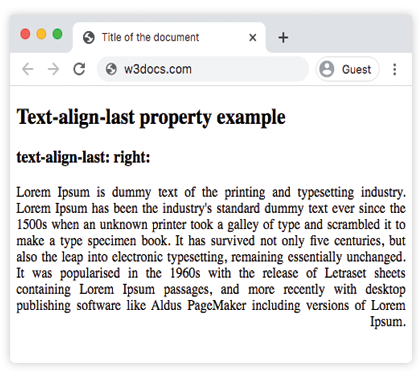
text-align-last: auto | left | right | center | justify | start | end | initial | inherit;Пример свойства text-align-last:
Пример кода CSS text-align-last
html
<!DOCTYPE html>
<html>
  <head>
    <title>Title of the document</title>
    <style>
      .demo {
        text-align: justify;
        text-align-last: right;
      }
    </style>
  </head>
  <body>
    <h2>Text-align-last property example</h2>
    <h3>text-align-last: right:</h3>
    <div class="demo">
      Lorem Ipsum is dummy text of the printing and typesetting industry. Lorem Ipsum has been the industry's standard dummy text ever since the 1500s when an unknown printer took a galley of type and scrambled it to make a type specimen book. It has survived not only five centuries, but also the leap into electronic typesetting, remaining essentially unchanged. It was popularised in the 1960s with the release of Letraset sheets containing Lorem Ipsum passages, and more recently with desktop publishing software like Aldus PageMaker including versions of Lorem Ipsum.
    </div>
  </body>
</html>Результат
Пример свойства text-align-last со значениями "start", "justify" и "center":
Пример всех значений CSS text-align-last
html
<!DOCTYPE html>
<html>
  <head>
    <title>Title of the document</title>
    <style>
      .demo1 {
        text-align: justify;
        text-align-last: start;
      }
      .demo2 {
        text-align: justify;
        text-align-last: center;
      }
      .demo3 {
        text-align: justify;
        text-align-last: justify;
      }
    </style>
  </head>
  <body>
    <h2>Text-align-last property example</h2>
    <h3>Text-align-last: start:</h3>
    <div class="demo1">
      Lorem Ipsum is dummy text of the printing and typesetting industry. Lorem Ipsum has been the industry's standard dummy text ever since the 1500s when an unknown printer took a galley of type and scrambled it to make a type specimen book. It has survived not only five centuries, but also the leap into electronic typesetting, remaining essentially unchanged. It was popularised in the 1960s with the release of Letraset sheets containing Lorem Ipsum passages, and more recently with desktop publishing software like Aldus PageMaker including versions of Lorem Ipsum.
    </div>
    <h3>Text-align-last: center:</h3>
    <div class="demo2">
      Lorem Ipsum is dummy text of the printing and typesetting industry. Lorem Ipsum has been the industry's standard dummy text ever since the 1500s when an unknown printer took a galley of type and scrambled it to make a type specimen book. It has survived not only five centuries, but also the leap into electronic typesetting, remaining essentially unchanged. It was popularised in the 1960s with the release of Letraset sheets containing Lorem Ipsum passages, and more recently with desktop publishing software like Aldus PageMaker including versions of Lorem Ipsum.
    </div>
    <h3>Text-align-last: justify:</h3>
    <div class="demo3">
      Lorem Ipsum is dummy text of the printing and typesetting industry. Lorem Ipsum has been the industry's standard dummy text ever since the 1500s when an unknown printer took a galley of type and scrambled it to make a type specimen book. It has survived not only five centuries, but also the leap into electronic typesetting, remaining essentially unchanged. It was popularised in the 1960s with the release of Letraset sheets containing Lorem Ipsum passages, and more recently with desktop publishing software like Aldus PageMaker including versions of Lorem Ipsum.
    </div>
  </body>
</html>Пример свойства text-align-last со значением "end":
Пример свойства text-align-last со значением "end":
html
<!DOCTYPE html>
<html>
  <head>
    <title>Title of the document</title>
    <style>
      .demo {
        text-align: justify;
        text-align-last: end;
      }
    </style>
  </head>
  <body>
    <h2>Text-align-last property example</h2>
    <h3>text-align-last: end:</h3>
    <div class="demo">
      <p>
        Lorem Ipsum is dummy text of the printing and typesetting industry. Lorem Ipsum has been the industry's standard dummy text ever since the 1500s when an unknown printer took a galley of type and scrambled it to make a type specimen book. It has survived not only five centuries, but also the leap into electronic typesetting, remaining essentially unchanged. It was popularised in the 1960s with the release of Letraset sheets containing Lorem Ipsum passages, and more recently with desktop publishing software like Aldus PageMaker including versions of Lorem Ipsum.
      </p>
      <p>
        Lorem Ipsum is dummy text of the printing and typesetting industry. Lorem Ipsum has been the industry's standard dummy text ever since the 1500s when an unknown printer took a galley of type and scrambled it to make a type specimen book. It has survived not only five centuries, but also the leap into electronic typesetting, remaining essentially unchanged.
      </p>
      <p>
        Lorem Ipsum is dummy text of the printing and typesetting industry. Lorem Ipsum has been the industry's standard dummy text ever since the 1500s when an unknown printer took a galley of type and scrambled it to make a type specimen book.
      </p>
    </div>
  </body>
</html>Значения
| Значение | Описание | Запустить |
|---|---|---|
| auto | Использует значение свойства text-align. Это значение по умолчанию. | Запустить » |
| left | Выравнивает последнюю строку по левому краю. | Запустить » |
| right | Выравнивает последнюю строку по правому краю. | Запустить » |
| center | Выравнивает последнюю строку по центру. | Запустить » |
| justify | Последняя строка выравнивается по ширине, как и остальные. | Запустить » |
| start | Последняя строка выравнивается по началу строки. Слева, если направление слева направо, и справа, если направление справа налево. | Запустить » |
| end | Последняя строка выравнивается по концу строки. Справа, если направление слева направо, и слева, если направление справа налево. | Запустить » |
| initial | Заставляет свойство использовать значение по умолчанию. | Запустить » |
| inherit | Наследует свойство от родительского элемента. | Запустить » |
Практика
Что делает свойство 'text-align-last' в CSS?