Свойство CSS font-size
Свойство font-size определяет размер шрифта текста.
Размер шрифта можно задать следующими способами:
- absolute-size
- relative-size
- length
- percentage
Абсолютный размер шрифта включает следующие значения:
- xx-small
- x-small
- small
- medium
- large
- x-large
- xx-large
Относительный размер шрифта включает следующие значения:
- smaller
- larger
Длины могут быть относительными (em, ex, px) и абсолютными (in, cm, mm, pt, pc). Проценты задают абсолютный размер шрифта относительно размера шрифта родительского элемента.
| Initial Value | medium |
|---|---|
| Applies to | All elements. It also applies to ::first-letter and ::first-line. |
| Inherited | Yes. |
| Animatable | Yes. |
| Version | CSS1 |
| DOM Syntax | object.style.fontSize = "15px"; |
Синтаксис
Синтаксис свойства CSS font-size
font-size: medium | xx-small | x-small | small | large | x-large | xx-large | smaller | larger | length | initial | inherit;Пример свойства font-size:
Пример свойства CSS font-size с значениями px,em,pt,x-small и %(percentage)
<!DOCTYPE html>
<html>
  <head>
    <title>Title of the document</title>
    <style>
      h1 {
        font-size: 24pt;
      }
      h3 {
        font-size: 26px;
      }
      p {
        font-size: 1em;
      }
      a {
        font-size: 100%;
      }
      span {
        font-size: x-small;
      }
    </style>
  </head>
  <body>
    <span>This span is written with x-small value.</span>
    <p>This paragraph is written with 1em font-size.</p>
    <a href="https://www.w3docs.com/">This hyperlink is written with 100% font-size.</a>
    <h3>We used x-small font size for this heading.</h3>
    <h1>We set the font size 24pt  for this heading.</h1>
  </body>
</html>Результат
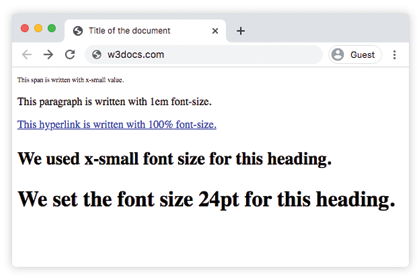
Использование значений в процентах
Значения в процентах зависят от размера шрифта родительского элемента. В коде ниже показано их использование:
Пример свойства font-size, заданного в процентах:
Пример свойства font-size, заданного в процентах:
<!DOCTYPE html>
<html>
  <head>
    <title>Title of the document</title>
    <style>
      h3 {
        font-size: 125%;
      }
    </style>
  </head>
  <body>
    <h3>We used x-small font size for this heading.</h3>
    <span>This span is written with x-small value.</span>
    <p>This paragraph is written with 1em font-size.</p>
  </body>
</html>
Использование единицы em
Единица em считается относительной единицей. Она основана на вычисленном значении размера шрифта родительского элемента. В примере ниже абзац будет 32px, потому что 2x16=32, а заголовок будет иметь размер шрифта 48px, потому что 3x16=48px. Этот метод очень полезен, потому что мы можем быть уверены, что все дочерние элементы всегда будут относительными друг к другу.
Пример свойства font-size со значением "em":
Пример свойства font-size со значением "em":
<!DOCTYPE html>
<html>
  <head>
    <title>Title of the document</title>
    <style>
      .container {
        font-size: 16px;
      }
      p {
        font-size: 2em;
      }
      h2 {
        font-size: 3em;
      }
    </style>
  </head>
  <body>
    <div class="container">
      <h2>Here is the heading</h2>
      <p>Here is the text.</p>
    </div>
  </body>
</html>Использование единицы rem
При использовании единицы rem размер шрифта зависит от значения элемента HTML. В примере ниже единица rem наследуется от элемента HTML, поэтому она равна 24px. Следовательно, заголовок будет иметь размер шрифта 24px, потому что 1.5x16=24px.
Пример свойства font-size со значением "rem":
Пример свойства font-size со значением "rem":
<!DOCTYPE html>
<html>
  <head>
    <title>Title of the document</title>
    <style>
      html {
        font-size: 16px;
      }
      h2 {
        font-size: 1.5rem;
      }
    </style>
  </head>
  <body>
    <div class="container">
      <h2>Here is the heading</h2>
      <p>Here is the text.</p>
    </div>
  </body>
</html>Использование единицы ex
В случае использования единицы ex, 1ex равен вычисленной высоте буквы 'x' в шрифте текущего элемента. В примере кода ниже HTML-элемент имеет размер 15px. Высота символа x в этом конкретном шрифте определит все остальные размеры шрифта.
Свойство CSS font-size
.exunit {
  font-size: 15ex;
}
Использование единиц viewport
Единицы viewport (vw и vh) используются для задания размера шрифта элемента, который зависит от размера области просмотра.
- 1vw = 1% ширины области просмотра
- 1vh = 1% высоты области просмотра
Свойство CSS font-size
.viewport {
  font-size: 120vh;
}
Пример свойства font-size со значением "length":
Пример свойства font-size со значением "length"
<!DOCTYPE html>
<html>
  <head>
    <title>Title of the document</title>
    <style>
      span {
        color: green;
        font-size: 2vh;
      }
      p {
        color: red;
        font-size: 1em;
      }
      .length {
        color: orange;
        font-size: 30px;
      }
      h3 {
        color: lightblue;
        font-size: 3ex;
      }
      h1 {
        color: purple;
        font-size: 24pt;
      }
      a {
        color: blue;
        font-size: 120%;
      }
    </style>
  </head>
  <body>
    <h2>Font-size property</h2>
    <span>This text is written with 2vh font-size.</span>
    <p>This paragraph is written with 1em font-size.</p>
    <div class="length">Example with 30px font-size length </div>
    <h3>Example with 3ex font-size length.</h3>
    <h1>We set the font size 24pt  for this heading.</h1>
    <a href="https://www.w3docs.com/">This hyperlink is written with 100% font-size.</a>
  </body>
</html>Пример свойства font-size со значениями absolute-size:
Пример свойства font-size (absolute-size):
<!DOCTYPE html>
<html>
  <head>
    <title>Title of the document</title>
    <style>
      .font-xxsmall {
        color: grey;
        font-size: xx-small;
      }
      .font-xsmall {
        color: grey;
        font-size: x-small;
      }
      .font-small {
        color: grey;
        font-size: small;
      }
      .font-medium {
        color: grey;
        font-size: medium;
      }
      .font-large {
        color: grey;
        font-size: large;
      }
      .font-xlarge {
        color: grey;
        font-size: x-large;
      }
      .font-xxlarge {
        color: grey;
        font-size: xx-large;
      }
    </style>
  </head>
  <body>
    <h1>Font-size property</h1>
    <div class="font-xxsmall">Example with font-size xx-small property</div>
    <div class="font-xsmall">Example with font-size x-small property</div>
    <div class="font-small">Example with font-size small property</div>
    <div class="font-medium">Example with font-size medium property</div>
    <div class="font-large">Example with font-size large property</div>
    <div class="font-xlarge">Example with font-size x-large property</div>
    <div class="font-xxlarge">Example with font-size xx-large property</div>
  </body>
</html>Пример свойства font-size со значениями "smaller" и "larger":
Пример свойства font-size со значениями "smaller" и "larger":
<!DOCTYPE html>
<html>
  <head>
    <title>Title of the document</title>
    <style>
      .smaller {
        color: red;
        font-size: smaller;
      }
      .larger {
        color: red;
        font-size: larger;
      }
    </style>
  </head>
  <body>
    <h1>font-size property</h1>
    <div class="smaller">Example with font-size smaller property</div>
    <div class="larger">Example with font-size larger property</div>
  </body>
</html>Значения
| Value | Description | Play it |
|---|---|---|
| medium | Устанавливает размер шрифта medium. Это значение по умолчанию для этого свойства. | Play it » |
| xx-small | Устанавливает размер шрифта xx-small. | Play it » |
| x-small | Устанавливает размер шрифта x-small. | Play it » |
| small | Устанавливает размер шрифта small. | Play it » |
| large | Устанавливает размер шрифта large. | Play it » |
| x-large | Устанавливает размер шрифта x-large. | Play it » |
| xx-large | Устанавливает размер шрифта xx-large. | Play it » |
| smaller | Делает размер шрифта меньше. | Play it » |
| larger | Делает размер шрифта больше. | Play it » |
| length | Задает размер шрифта с помощью px, em и т. д. | Play it » |
| % | Устанавливает размер шрифта как процент от размера шрифта родительского элемента. | Play it » |
| initial | Заставляет свойство использовать значение по умолчанию. | Play it » |
| inherit | Наследует свойство от родительского элемента. |
Practice
Какие единицы можно использовать для задания свойства 'font-size' в CSS?