Свойство CSS column-fill
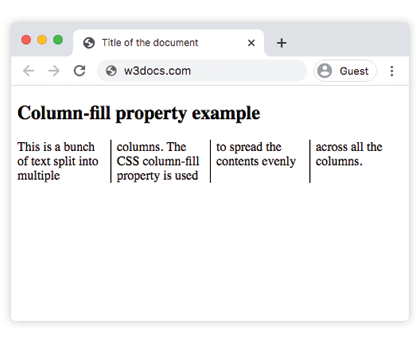
Свойство column-fill определяет, заполняются ли колонки равномерно или последовательно.
Свойство column-fill является одним из свойств CSS3.
Если для многострочного контейнера задана высота, вы можете управлять тем, как контент распределяется по колонкам. Поддерживаются два значения: balance и auto. balance является значением по умолчанию и равномерно распределяет контент по колонкам. При использовании auto колонки заполняются последовательно до достижения ограничения по высоте.
| Начальное значение | balance |
|---|---|
| Применяется к | Многострочным элементам. |
| Наследуется | Нет. |
| Анимация | Нет. |
| Версия | CSS3 |
| Синтаксис DOM | object.style.columnFill = "balance"; |
Синтаксис
css
column-fill: auto | balance | balance-all | initial | inherit;Пример свойства column-fill со значением balance
html
<!DOCTYPE html>
<html>
  <head>
    <title>Title of the document</title>
    <style>
      .balance {
        column-count: 4;
        column-rule: 1px solid black;
        column-fill: balance;
      }
    </style>
  </head>
  <body>
    <h1>Column-fill property example</h1>
    <p class="balance">
      This is a bunch of text split into multiple columns. The CSS column-fill property is used to spread the contents evenly across all the columns. Lorem ipsum dolor sit amet, consectetur adipiscing elit. Sed do eiusmod tempor incididunt ut labore et dolore magna aliqua. Ut enim ad minim veniam, quis nostrud exercitation ullamco laboris nisi ut aliquip ex ea commodo consequat. Duis aute irure dolor in reprehenderit in voluptate velit esse cillum dolore eu fugiat nulla pariatur. Excepteur sint occaecat cupidatat non proident, sunt in culpa qui officia deserunt mollit anim id est laborum.
    </p>
  </body>
</html>Результат
Пример свойства column-fill со значением auto
html
<!DOCTYPE html>
<html>
  <head>
    <title>Title of the document</title>
    <style>
      .auto {
        column-count: 3;
        column-rule: 1px solid black;
        column-fill: auto;
      }
    </style>
  </head>
  <body>
    <h1>Column-fill property example</h1>
    <p class="auto">
      This is a bunch of text split into multiple columns. The CSS column-fill property is used to fill columns sequentially. Lorem ipsum dolor sit amet, consectetur adipiscing elit. Sed do eiusmod tempor incididunt ut labore et dolore magna aliqua. Ut enim ad minim veniam, quis nostrud exercitation ullamco laboris nisi ut aliquip ex ea commodo consequat. Duis aute irure dolor in reprehenderit in voluptate velit esse cillum dolore eu fugiat nulla pariatur. Excepteur sint occaecat cupidatat non proident, sunt in culpa qui officia deserunt mollit anim id est laborum.
    </p>
  </body>
</html>Значения
| Значение | Описание |
|---|---|
| auto | Заполняет колонки последовательно. |
| balance | Равномерно распределяет контент между колонками. В страничных медиа балансируется только последняя страница. |
| balance-all | Равномерно распределяет контент между колонками. В страничных медиа балансируются все страницы. |
| initial | Устанавливает свойству значение по умолчанию. |
| inherit | Наследует свойство от родительского элемента. |
Практика
В чем функция свойства 'column-fill' в CSS?