Свойство CSS text-decoration-style
Свойство text-decoration-style определяет стиль декорирования текста. Стили могут быть сплошными, пунктирными, точечными, двойными и волнистыми.
Свойство text-decoration-style является одним из свойств CSS3.
| Начальное значение | solid |
|---|---|
| Применяется к | Всем элементам. Также применяется к ::first-letter и ::first-line. |
| Наследуется | Нет. |
| Анимация | Нет. |
| Версия | CSS3 |
| Синтаксис DOM | object.style.textDecorationStyle = "dotted"; |
Синтаксис
Значения CSS text-decoration-style
css
text-decoration-style: solid | double | dotted | dashed | wavy | initial | inherit;Пример свойства text-decoration-style:
Пример text-decoration-style
html
<!DOCTYPE html>
<html>
  <head>
    <title>Title of the document</title>
    <style>
      div {
        text-decoration-line: underline;
        text-decoration-style: solid;
        text-decoration-color: #1c87c9;
      }
    </style>
  </head>
  <body>
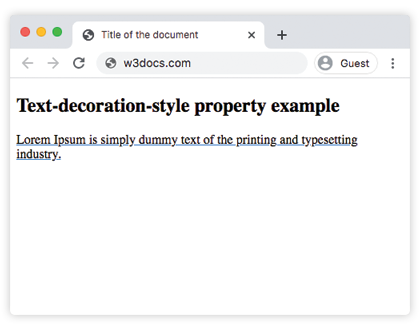
    <h2>Text-decoration-style property example</h2>
    <div>Lorem Ipsum is simply dummy text of the printing and typesetting industry.</div>
  </body>
</html>Результат
Пример свойства text-decoration-style со значением "wavy":
Пример кода text-decoration-style wavy
html
<!DOCTYPE html>
<html>
  <head>
    <title>Title of the document</title>
    <style>
      div {
        text-decoration-line: underline;
        text-decoration-style: wavy;
        text-decoration-color: #1c87c9;
      }
    </style>
  </head>
  <body>
    <h2>Text-decoration-style property example</h2>
    <div>Lorem Ipsum is simply dummy text of the printing and typesetting industry.</div>
  </body>
</html>Пример свойства text-decoration-style со значением "dotted":
Пример кода text-decoration-style dotted
html
<!DOCTYPE html>
<html>
  <head>
    <title>Title of the document</title>
    <style>
      div {
        text-decoration-line: overline;
        text-decoration-style: dotted;
        text-decoration-color: #1c87c9;
      }
    </style>
  </head>
  <body>
    <h2>Text-decoration-style property example</h2>
    <div>Lorem Ipsum is simply dummy text of the printing and typesetting industry.</div>
  </body>
</html>Пример свойства text-decoration-style со значением "dashed":
Пример кода text-decoration-style dashed
html
<!DOCTYPE html>
<html>
  <head>
    <title>Title of the document</title>
    <style>
      div {
        text-decoration-line: overline;
        text-decoration-style: dashed;
        text-decoration-color: #1c87c9;
      }
    </style>
  </head>
  <body>
    <h2>Text-decoration-style property example</h2>
    <div>
      Lorem Ipsum is simply dummy text of the printing and typesetting industry.
    </div>
  </body>
</html>Пример свойства text-decoration-style со значением "double":
Пример кода text-decoration-style double
html
<!DOCTYPE html>
<html>
  <head>
    <title>Title of the document</title>
    <style>
      div {
        text-decoration-line: overline underline;
        text-decoration-style: double;
        text-decoration-color: #1c87c9;
      }
    </style>
  </head>
  <body>
    <h2>Text-decoration-style property example</h2>
    <div>
      Lorem Ipsum is simply dummy text of the printing and typesetting industry.
    </div>
  </body>
</html>Пример свойства text-decoration-style со всеми значениями:
Пример всех значений text-decoration-style
html
<!DOCTYPE html>
<html>
  <head>
    <title>Title of the document</title>
    <style>
      div {
        margin: 20px 0;
      }
      div.t1 {
        text-decoration-line: overline underline;
        text-decoration-style: solid;
      }
      div.t2 {
        text-decoration-line: line-through;
        text-decoration-style: wavy;
      }
      div.t3 {
        text-decoration-line: overline underline;
        text-decoration-style: double;
      }
      div.t4 {
        text-decoration-line: overline;
        text-decoration-style: dashed;
      }
      div.t5 {
        text-decoration-line: line-through;
        text-decoration-style: dotted;
      }
    </style>
  </head>
  <body>
    <h2>Text-decoration-style property example</h2>
    <div class="t1">
      Lorem Ipsum is simply dummy text of the printing and typesetting industry.
    </div>
    <div class="t2">
      Lorem Ipsum is simply dummy text of the printing and typesetting industry.
    </div>
    <div class="t3">
      Lorem Ipsum is simply dummy text of the printing and typesetting industry.
    </div>
    <div class="t4">
      Lorem Ipsum is simply dummy text of the printing and typesetting industry.
    </div>
    <div class="t5">
      Lorem Ipsum is simply dummy text of the printing and typesetting industry.
    </div>
  </body>
</html>Значения
| Значение | Описание | Запустить » |
|---|---|---|
| solid | Определяет одну сплошную линию. Это значение по умолчанию для данного свойства. | Запустить » |
| double | Определяет двойную линию. | Запустить » |
| dotted | Определяет пунктирную линию. | Запустить » |
| dashed | Определяет штриховую линию. | Запустить » |
| wavy | Определяет волнистую линию. | Запустить » |
| initial | Устанавливает свойству значение по умолчанию. | Запустить » |
| inherit | Наследует свойство от родительского элемента. |
Практика
Какое из следующих значений является допустимым для свойства 'text-decoration-style' в CSS?