Свойство CSS flex-flow
Свойство flex-flow считается сокращённым для свойств flex-wrap и flex-direction.
Это свойство входит в число свойств CSS3. Оно является частью модуля Flexible Box Layout.
Если гибкие элементы отсутствуют, свойство flex-flow не окажет никакого эффекта.
Современные браузеры поддерживают свойство flex-flow нативно, без вендорных префиксов.
| Начальное значение | row nowrap |
|---|---|
| Применяется к | Flex-контейнеры |
| Наследуется | Нет. |
| Анимация | Нет. |
| Версия | CSS3 |
| DOM-синтаксис | object.style.flexFlow = "column nowrap"; |
Синтаксис
Синтаксис свойства CSS flex-flow
css
flex-flow: <flex-direction> || <flex-wrap>;
/* or */ initial | inherit;
При задании flex-flow: row wrap; первое значение определяет flex-direction, а второе — свойство flex-wrap.
Пример свойства CSS flex-flow
css
flex-flow: row wrap;Приведённый ниже код эквивалентен коду выше.
Пример свойств flex-direction и flex-wrap
css
flex-direction: row;
flex-wrap: wrap;
Пример свойства flex-flow со значениями "row" и "wrap":
html
<!DOCTYPE html>
<html>
  <head>
    <title>Title of the document</title>
    <style>
      .example {
        width: 200px;
        height: 200px;
        border: 1px solid #c3c3c3;
        display: flex;
        flex-flow: row wrap;
      }
      .example div {
        width: 50px;
        height: 50px;
      }
    </style>
  </head>
  <body>
    <h2>Flex-flow property example</h2>
    <div class="example">
      <div style="background-color: #8ebf42;">A</div>
      <div style="background-color: #1c87c9;">B</div>
      <div style="background-color: #cccccc;">C</div>
      <div style="background-color: #666666;">D</div>
      <div style="background-color: #4c4a4a;">E</div>
      <div style="background-color: #c6c4c4;">F</div>
    </div>
  </body>
</html>Пример свойства flex-flow со значениями "wrap-reverse" и "column":
html
<!DOCTYPE html>
<html>
  <head>
    <title>Title of the document</title>
    <style>
      .example {
        width: 200px;
        height: 200px;
        border: 1px solid #c3c3c3;
        display: flex;
        flex-flow: column wrap-reverse;
      }
      .example div {
        width: 50px;
        height: 50px;
      }
    </style>
  </head>
  <body>
    <h2>Flex-flow property example</h2>
    <div class="example">
      <div style="background-color: #8ebf42;">A</div>
      <div style="background-color: #1c87c9;">B</div>
      <div style="background-color: #cccccc;">C</div>
      <div style="background-color: #666666;">D</div>
      <div style="background-color: #4c4a4a;">E</div>
      <div style="background-color: #c6c4c4;">F</div>
    </div>
  </body>
</html>Пример свойства flex-flow со значениями "row" и "nowrap":
html
<!DOCTYPE html>
<html>
  <head>
    <title>Title of the document</title>
    <style>
      .example {
        width: 200px;
        height: 200px;
        border: 1px solid #c3c3c3;
        display: flex;
        flex-flow: row nowrap;
      }
      .example div {
        width: 50px;
        height: 50px;
      }
    </style>
  </head>
  <body>
    <h2>Flex-flow property example</h2>
    <div class="example">
      <div style="background-color: #8ebf42;">A</div>
      <div style="background-color: #1c87c9;">B</div>
      <div style="background-color: #cccccc;">C</div>
      <div style="background-color: #666666;">D</div>
      <div style="background-color: #4c4a4a;">E</div>
      <div style="background-color: #c6c4c4;">F</div>
    </div>
  </body>
</html>Результат
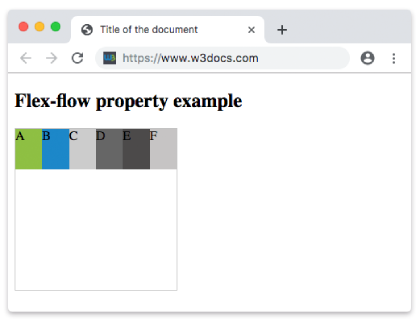
Пример свойства flex-flow со значениями "row-reverse" и "nowrap":
html
<!DOCTYPE html>
<html>
  <head>
    <title>Title of the document</title>
    <style>
      .example {
        width: 200px;
        height: 200px;
        border: 1px solid #c3c3c3;
        display: flex;
        flex-flow: row-reverse nowrap;
      }
      .example div {
        width: 50px;
        height: 50px;
      }
    </style>
  </head>
  <body>
    <h2>Flex-flow property example</h2>
    <div class="example">
      <div style="background-color: #8ebf42;">A</div>
      <div style="background-color: #1c87c9;">B</div>
      <div style="background-color: #cccccc;">C</div>
      <div style="background-color: #666666;">D</div>
      <div style="background-color: #4c4a4a;">E</div>
      <div style="background-color: #c6c4c4;">F</div>
    </div>
  </body>
</html>Пример свойства flex-flow со значениями "column" и "nowrap":
html
<!DOCTYPE html>
<html>
  <head>
    <title>Title of the document</title>
    <style>
      .example {
        width: 200px;
        height: 200px;
        border: 1px solid #c3c3c3;
        display: flex;
        flex-flow: column nowrap;
      }
      .example div {
        width: 50px;
        height: 50px;
      }
    </style>
  </head>
  <body>
    <h2>Flex-flow property example</h2>
    <div class="example">
      <div style="background-color: #8ebf42;">A</div>
      <div style="background-color: #1c87c9;">B</div>
      <div style="background-color: #cccccc;">C</div>
      <div style="background-color: #666666;">D</div>
      <div style="background-color: #4c4a4a;">E</div>
      <div style="background-color: #c6c4c4;">F</div>
    </div>
  </body>
</html>Пример свойства flex-flow со значениями "column-reverse" и "nowrap":
html
<!DOCTYPE html>
<html>
  <head>
    <title>Title of the document</title>
    <style>
      .example {
        width: 200px;
        height: 200px;
        border: 1px solid #c3c3c3;
        display: flex;
        flex-flow: column-reverse nowrap;
      }
      .example div {
        width: 50px;
        height: 50px;
      }
    </style>
  </head>
  <body>
    <h2>Flex-flow property example</h2>
    <div class="example">
      <div style="background-color: #8ebf42;">A</div>
      <div style="background-color: #1c87c9;">B</div>
      <div style="background-color: #cccccc;">C</div>
      <div style="background-color: #666666;">D</div>
      <div style="background-color: #4c4a4a;">E</div>
      <div style="background-color: #c6c4c4;">F</div>
    </div>
  </body>
</html>Значения
| Значение | Описание | Запустить |
|---|---|---|
| flex-direction | Определяет направление гибких элементов. Возможные значения: row row-reverse column column-reverse initial inherit | Запустить » |
| flex-wrap | Определяет, должны ли гибкие элементы переноситься или нет. Возможные значения: nowrap wrap wrap-reverse initial inherit | Запустить » |
| initial | Устанавливает для свойства значение по умолчанию. | Запустить » |
| inherit | Наследует свойство от родительского элемента. |
Практика
Что верно относительно свойства 'flex-flow' в CSS?