Свойство CSS column-count
Свойство column-count определяет количество колонок, на которые будет разделено содержимое элемента.
Свойство column-count является одним из свойств CSS3.
Оно принимает числовое значение или ключевое слово auto. auto является значением по умолчанию. При установке в auto количество колонок определяется другими свойствами, такими как column-width. Числовое значение указывает точное количество колонок, на которое должно быть разделено содержимое элемента.
| Начальное значение | auto |
|---|---|
| Применяется к | Блочным контейнерам, за исключением обёрток таблиц. |
| Наследуется | Нет. |
| Анимация | Да. Количество колонок можно анимировать. |
| Версия | CSS3 |
| Синтаксис DOM | object.style.columnCount = "4"; |
Синтаксис
Синтаксис свойства column-count
css
column-count: <integer> | auto | initial | inherit;Пример свойства column-count:
Пример использования свойства CSS column-count со значением auto
html
<!DOCTYPE html>
<html>
  <head>
    <title>Title of the document</title>
    <style>
      div {
        column-count: auto;
      }
    </style>
  </head>
  <body>
    <h2>Column-count property example</h2>
    <div>
      Lorem Ipsum is dummy text of the printing and typesetting industry. Lorem Ipsum has been the industry's standard dummy text ever since the 1500s, when an unknown printer took a galley of type and scrambled it to make a type specimen book. It has survived not only five centuries, but also the leap into electronic typesetting, remaining essentially unchanged. It was popularised in the 1960s with the release of Letraset sheets containing Lorem Ipsum passages, and more recently with desktop publishing software like Aldus PageMaker including versions of Lorem Ipsum.
    </div>
  </body>
</html>Результат
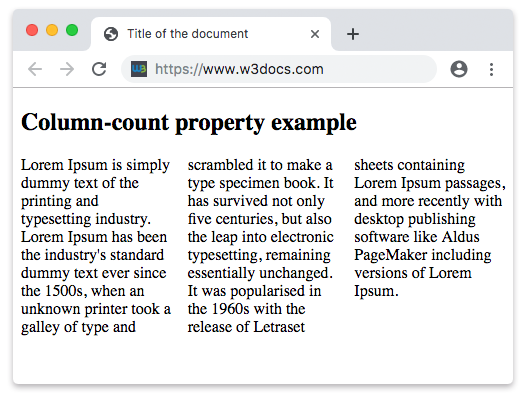
Пример свойства column-count со значением числа:
Пример использования свойства CSS column-count со значением числа
html
<!DOCTYPE html>
<html>
  <head>
    <title>Title of the document</title>
    <style>
      div {
        column-count: 7;
      }
    </style>
  </head>
  <body>
    <h2>Column-count property example</h2>
    <div>
      Lorem Ipsum is dummy text of the printing and typesetting industry. Lorem Ipsum has been the industry's standard dummy text ever since the 1500s when an unknown printer took a galley of type and scrambled it to make a type specimen book. It has survived not only five centuries, but also the leap into electronic typesetting, remaining essentially unchanged. It was popularised in the 1960s with the release of Letraset sheets containing Lorem Ipsum passages, and more recently with desktop publishing software like Aldus PageMaker including versions of Lorem Ipsum. It is a great fact that a reader will be distracted by the readable content of a page when looking at its layout.
    </div>
  </body>
</html>Значения
| Значение | Описание | Запустить |
|---|---|---|
| auto | Количество колонок определяется другими свойствами. Это значение по умолчанию для данного свойства. | Запустить » |
<integer> | Указывает точное количество колонок, на которое должно быть разделено содержимое. | Запустить » |
| initial | Устанавливает свойству значение по умолчанию. | Запустить » |
| inherit | Наследует свойство от родительского элемента. |
Практика
В чём заключается функция свойства CSS 'column-count'?