CSS свойство position
Свойство position задаёт положение элемента в документе.
Это свойство имеет следующие значения:
- static
- fixed
- absolute
- relative
- sticky
Виды позиционирования
Позиционированные элементы — когда элемент позиционирован, его положение на странице определяется с помощью свойств смещения: top, right, bottom и left. Свойства смещения не работают для статических элементов.
Элементы с относительным позиционированием — значение position равно "relative". Свойства top и bottom задают вертикальное смещение от его нормальной позиции, а left и right — горизонтальное смещение.
Элементы с абсолютным позиционированием — значение position равно "absolute" или "fixed". Свойства top, right, bottom и left задают смещение от краёв блока-контейнера элемента.
Элементы с липким позиционированием — значение position равно "sticky". Они рассматриваются как комбинация элементов с "relative" и "fixed" позиционированием.
| Начальное значение | static |
|---|---|
| Применяется к | Ко всем элементам. |
| Наследуется | Нет. |
| Анимация | Нет. |
| Версия | CSS2 |
| Синтаксис DOM | Object.style.position = "sticky"; |
Синтаксис
Синтаксис CSS position
position: static | absolute | fixed | relative | sticky | initial | inherit;Пример использования свойства position:
Пример кода CSS position
<!DOCTYPE html>
<html>
  <head>
    <title>Title of the document</title>
    <style>
      p {
        position: absolute;
        left: 40px;
        top: 120px;
      }
    </style>
  </head>
  <body>
    <h2>Position property example</h2>
    <p>Lorem Ipsum is dummy text of the printing and typesetting industry. Lorem Ipsum has been the industry's standard dummy text ever since the 1500s when an unknown printer took a galley of type and scrambled it to make a type specimen book.</p>
  </body>
</html>Результат
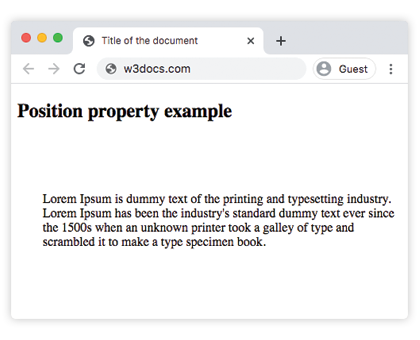
Пример свойства position со всеми значениями:
Пример всех значений CSS position
<!DOCTYPE html>
<html>
  <head>
    <title>Title of the document</title>
    <style>
      #box1 {
        position: static;
        border: 2px solid #666;
        width: 300px;
        height: 100px;
      }
      #box2 {
        position: absolute;
        border: 2px solid #8ebf42;
        top: 70px;
        right: 15px;
      }
      #box3 {
        position: relative;
        border: 2px solid #666;
        width: 300px;
        height: 100px;
      }
      #box4 {
        position: absolute;
        border: 2px solid #8ebf42;
        top: 70px;
        right: 15px;
      }
      #box5 {
        position: absolute;
        border: 2px solid #666;
        width: 320px;
        height: 100px;
        top: 750px;
        right: 25px;
      }
      #box6 {
        position: absolute;
        border: 2px solid #8ebf42;
        top: 70px;
        right: 15px;
      }
      #box7 {
        position: fixed;
        border: 2px solid #8ebf42;
        background-color: #eee;
        width: 300px;
        height: 100px;
        bottom: 0;
        left: 0;
        right: 0;
      }
      #box8 {
        position: absolute;
        border: 2px solid #666;
        top: 70px;
        right: 15px;
      }
    </style>
  </head>
  <body>
    <h2>Position property example</h2>
    <h3>Position: static</h3>
    <p>
      The Box1 element remains in the natural flow of the page and does not act as anchor point for the absolutely positioned Box2 element:
    </p>
    <div id="box1">
      Box1: position: static.
      <div id="box2">Box2: position: absolute, right: 15px, top: 70px</div>
    </div>
    <h3>Position: relative</h3>
    <p>
      The Box3 element remains in the natural flow of the page and also acts as anchor point for the absolutely positioned Box4 element:
    </p>
    <div id="box3">
      Box3: position: relative.
      <div id="box4">Box4: position: absolute, right: 15px, top: 70px</div>
    </div>
    <h3>Position: absolute</h3>
    <p>
      The Box5 element does not remain in the natural flow of the page. It positions itself according to the closest positioned ancestor and also acts as anchor point for the absolutely positioned Box6 element:
    </p>
    <div id="box5">
      Box5: position: absolute, top: 750px, right: 15px.
      <div id="box6">Box6: position: absolute, right: 15px, top: 70px</div>
    </div>
    <h3>Position: fixed</h3>
    <p>
      The Box7 element does not remain in the natural flow of the page and positions itself according to the viewport and acts as anchor point for the absolutely positioned Box8 element:
    </p>
    <div id="box7">
      Box7: position: fixed, bottom: 0, left: 0, right: 0.
      <div id="box8">Box8: position: absolute, right: 15px, top: 70px</div>
    </div>
  </body>
</html>В приведённом примере мы используем все значения, чтобы показать различия:
Пример свойства position со значением "sticky":
Пример свойства position со значением "sticky":
<!DOCTYPE html>
<html>
  <head>
    <title>Title of the document</title>
    <style>
      ul {
        height: 150px;
        overflow: auto;
        position: relative;
        background-color: #cccccc;
        padding: 0;
      }
      ul li {
        list-style-type: none;
        height: 30px;
        padding: 10px 10px 0;
      }
      ul li:first-child {
        position: -webkit-sticky;
        position: sticky;
        top: 1px;
        background-color: #dddddd;
      }
    </style>
  </head>
  <body>
    <h2>Example of the position property with the "sticky" value:</h2>
    <ul>
      <li>Sticky List Item</li>
      <li>List Item 1</li>
      <li>List Item 2</li>
      <li>List Item 3</li>
      <li>List Item 4</li>
      <li>List Item 5</li>
      <li>List Item 6</li>
      <li>List Item 7</li>
      <li>List Item 8</li>
      <li>List Item 9</li>
    </ul>
  </body>
</html>Значения
| Значение | Описание | Воспроизвести |
|---|---|---|
| static | Элементы размещаются в соответствии с обычным потоком документа. Это значение по умолчанию для данного свойства. | Воспроизвести » |
| absolute | Элементы удаляются из потока документа и позиционируются относительно его ближайшего позиционированного предка. | Воспроизвести » |
| fixed | Элементы удаляются из потока документа и позиционируются относительно окна браузера. | Воспроизвести » |
| relative | Элементы размещаются относительно своей нормальной позиции. | Воспроизвести » |
| sticky | Элементы позиционируются в соответствии с обычным потоком документа, а затем смещаются относительно ближайшего прокручиваемого предка и блока-контейнера. | |
| initial | Заставляет свойство использовать значение по умолчанию. | Воспроизвести » |
| inherit | Наследует свойство от родительского элемента. |
Практика
Какие существуют виды позиционирования в CSS?