Свойство CSS box-sizing
Свойство box-sizing определяет способ вычисления width и height элемента, если они включают padding и borders.
Свойство box-sizing — одно из свойств CSS3.
По умолчанию ширина и высота элемента вычисляются так:
- width + padding + border = фактическая ширина элемента
- height + padding + border = фактическая высота элемента
Поэтому, когда задана ширина и высота элемента, он часто выглядит больше, чем было указано (потому что border и padding элемента добавляются к заданным ширине и высоте).
| Initial Value | content-box |
|---|---|
| Applies to | All elements that accept width and height. |
| Inherited | No. |
| Animatable | No. |
| Version | CSS3 |
| DOM Syntax | object.style.boxSizing = "border-box"; |
Синтаксис
Синтаксис свойства CSS box-sizing
box-sizing: content-box | border-box | initial | inherit;В этом примере показаны два элемента <div> с одинаково заданными шириной и высотой:
Пример свойства box-sizing:
Пример свойства CSS box-sizing со значениями content-box и border-box
<!DOCTYPE html>
<html>
  <head>
    <style>
      .div1 {
        box-sizing: content-box;
        width: 400px;
        height: 50px;
        padding: 50px;
        border: 5px double #1c87c9;
      }
      .div2 {
        box-sizing: border-box;
        width: 400px;
        height: 50px;
        padding: 50px;
        border: 5px dashed #8ebf42;
      }
    </style>
  </head>
  <body>
    <h2>Box-sizing Example</h2>
    <hr />
    <h3>box-sizing: content-box (default):</h3>
    <div class="div1">The width for this div is set as 400px. Thus, the full width is 400px + 10px (left and right border) + 100px (left and right padding) = 510px.</div>
    <br />
    <h3>box-sizing: border-box:</h3>
    <div class="div2">The width and height apply to all parts of the div element: The full width is 400px.</div>
  </body>
</html>Результат
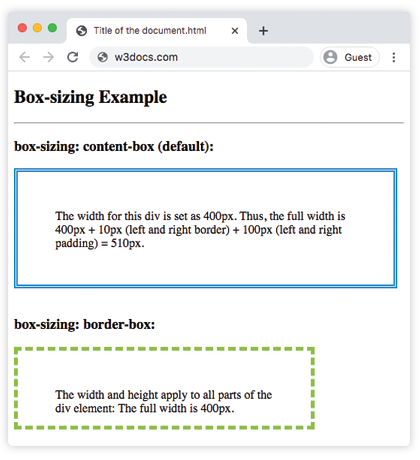
Если box-sizing задан как content-box, полная ширина будет больше заданной ширины div. А если задано box-sizing: border-box, padding и border будут включены в ширину и высоту.
Свойства box-sizing и border-box используются для компоновки элементов. Этот метод полезен, потому что он упрощает работу с размерами элементов, устраняя множество подводных камней, с которыми можно столкнуться при размещении содержимого.
Пример использования свойства box-sizing для создания двух рамочных блоков, расположенных рядом:
Пример свойства CSS box-sizing со значением border-box
<!DOCTYPE html>
<html>
  <head>
    <style>
      div.container {
        width: 100%;
        border: 2px double #1c87c9;
      }
      div.box {
        box-sizing: border-box;
        width: 50%;
        border: 3px solid #ccc;
        float: left;
        padding: 3px;
      }
    </style>
  </head>
  <body>
    <h2>Box-sizing Example</h2>
    <p>Here you can see two bordered boxes defined side by side.</p>
    <div class="container">
      <div class="box">Left part</div>
      <div class="box">Right part</div>
      <div style="clear:both;"></div>
    </div>
  </body>
</html>Значения
| Value | Description |
|---|---|
| content-box | The width and height properties include the content, but the padding, border, or margin aren't included. It is the default value. |
| border-box | The width and height properties include the content, padding and border, but do not include the margin. |
| initial | Sets the property to its default value. |
| inherit | Inherits the property from its parent element. |
Практика
What does the CSS 'box-sizing' property do?