Свойство CSS outline-style
Свойство CSS outline-style определяет стиль контура.
Оно похоже на свойство border, но есть отличие. Контур находится снаружи границы элемента и не занимает места. По умолчанию он рисуется вокруг всех четырёх сторон элемента.
Свойство outline-style может принимать следующие значения:
- none
- hidden
- dotted
- dashed
- solid
- double
- groove
- ridge
- inset
- outset
Свойства width и height элемента не включают ширину контура, поскольку контур не считается частью размеров элемента.
| Начальное значение | none |
|---|---|
| Применяется к | Всем элементам. |
| Наследуется | Нет. |
| Анимируемое | Нет. |
| Версия | CSS2 |
| Синтаксис DOM | object.style.outlineStyle = "dotted" |
Синтаксис
Синтаксис CSS outline-style
outline-style: none | hidden | dotted | dashed | solid | double | groove | ridge | inset | outset | initial | inherit;Пример свойства outline-style:
Пример свойства outline-style:
<!DOCTYPE html>
<html>
  <head>
    <title>Title of the document</title>
    <style>
      .p1 {
        outline-style: solid;
      }
      .p2 {
        outline-style: dashed;
      }
      .p3 {
        outline-style: dotted;
      }
      .p4 {
        outline-style: double;
      }
      .p5 {
        outline-style: none;/*hidden*/
      }
      .p6 {
        outline-style: groove;
        outline-color: #ccc;
      }
      .p7 {
        outline-style: ridge;
        outline-color: #ccc;
      }
      .p8 {
        outline-style: inset;
        outline-color: #ccc;
      }
      .p9 {
        outline-style: outset;
        outline-color: #ccc;
      }
    </style>
  </head>
  <body>
    <h2>Outline property example</h2>
    <p class="p1">This is a paragraph with outline set to solid.</p>
    <p class="p2">This is a paragraph with outline set to dashed.</p>
    <p class="p3">This is a paragraph with outline set to dotted.</p>
    <p class="p4">This is a paragraph with outline set to double.</p>
    <p class="p5">This is a paragraph with outline set to none.</p>
    <p class="p6">This is a paragraph with outline set to groove.</p>
    <p class="p7">This is a paragraph with outline set to ridge.</p>
    <p class="p8">This is a paragraph with outline set to inset.</p>
    <p class="p9">This is a paragraph with outline set to outset.</p>
  </body>
</html>Результат
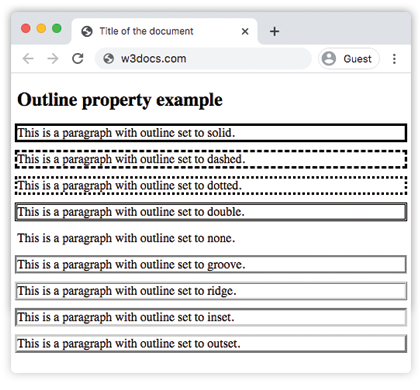
Пример свойства outline-style со всеми значениями:
CSS outline-style another code example
<!DOCTYPE html>
<html>
  <head>
    <title>Title of the document</title>
    <style>
      p.dotted {
        outline: 4px dotted gray;
      }
      p.dashed {
        outline: 0.2em dashed rgb(142, 191, 66);
      }
      p.solid {
        outline: 4px solid #ccc;
      }
      p.double {
        outline: 4px double #000;
      }
      p.groove {
        outline: 4px groove #666;
      }
      p.ridge {
        outline: thick ridge #1c87c9;
      }
      p.inset {
        outline: medium inset #1c87c9;
      }
      p.outset {
        outline: 4px outset #1c87c9;
      }
    </style>
  </head>
  <body>
    <h2>Outline property example</h2>
    <p class="dotted">Lorem Ipsum is simply dummy text of the printing...</p>
    <p class="dashed">Lorem Ipsum is simply dummy text of the printing...</p>
    <p class="solid">Lorem Ipsum is simply dummy text of the printing...</p>
    <p class="double">Lorem Ipsum is simply dummy text of the printing...</p>
    <p class="groove">Lorem Ipsum is simply dummy text of the printing...</p>
    <p class="ridge">Lorem Ipsum is simply dummy text of the printing...</p>
    <p class="inset">Lorem Ipsum is simply dummy text of the printing...</p>
    <p class="outset">Lorem Ipsum is simply dummy text of the printing...</p>
  </body>
</html>Пример свойства outline-style со значением "groove":
Пример свойства outline-style со значением groove
<!DOCTYPE html>
<html>
  <head>
    <title>Title of the document</title>
    <style>
      p {
        color: #7f7fa7;
        text-align: center;
        outline-width: 8px;
        outline-style: groove;
        padding: 10px;
      }
    </style>
  </head>
  <body>
    <h1>Outline property example</h1>
    <p>This is a paragraph with outline set to groove.</p>
  </body>
</html>Пример свойства outline-style со значением "ridge":
Пример свойства outline-style со значением ridge
<!DOCTYPE html>
<html>
  <head>
    <title>Title of the document</title>
    <style>
      p {
        color: #69afad;
        text-align: center;
        outline-width: 8px;
        outline-style: ridge;
        padding: 10px;
      }
    </style>
  </head>
  <body>
    <h1>Outline property example</h1>
    <p>This is a paragraph with outline set to ridge.</p>
  </body>
</html>Пример свойства outline-style со значением "inset":
Пример свойства outline-style со значением inset
<!DOCTYPE html>
<html>
  <head>
    <title>Title of the document</title>
    <style>
      p {
        color: #69afad;
        text-align: center;
        outline-width: 8px;
        outline-style: inset;
        padding: 10px;
      }
    </style>
  </head>
  <body>
    <h1>Outline property example</h1>
    <p>This is a paragraph with outline set to ridge.</p>
  </body>
</html>Пример свойства outline-style со значением "outset":
Пример свойства outline-style со значением outset:
<!DOCTYPE html>
<html>
  <head>
    <title>Title of the document</title>
    <style>
      p {
        color: #69afad;
        text-align: center;
        outline-width: 8px;
        outline-style: outset;
        padding: 10px;
      }
    </style>
  </head>
  <body>
    <h1>Outline property example</h1>
    <p>This is a paragraph with outline set to ridge.</p>
  </body>
</html>Пример свойства outline-style со значением "dotted":
Пример свойства outline-style со значением dotted:
<!DOCTYPE html>
<html>
  <head>
    <title>Title of the document</title>
    <style>
      p {
        color: #69afad;
        text-align: center;
        outline-width: 4px;
        outline-style: dotted;
        padding: 10px;
      }
    </style>
  </head>
  <body>
    <h1>Outline property example</h1>
    <p>This is a paragraph with outline set to ridge.</p>
  </body>
</html>Пример свойства outline-style со значением "dashed":
Пример свойства outline-style со значением dashed:
<!DOCTYPE html>
<html>
  <head>
    <title>Title of the document</title>
    <style>
      p {
        color: #69afad;
        text-align: center;
        outline-width: 4px;
        outline-style: dashed;
        padding: 10px;
      }
    </style>
  </head>
  <body>
    <h1>Outline property example</h1>
    <p>This is a paragraph with outline set to ridge.</p>
  </body>
</html>Значения
| Значение | Описание | Попробовать |
|---|---|---|
| none | Не будет отображать контур. Это значение по умолчанию для этого свойства. | Play it » |
| hidden | Определяет скрытый контур. | Play it » |
| dotted | Контур задаётся в виде серии точек. | Play it » |
| dashed | Контур задаётся в виде серии штрихов. | Play it » |
| solid | Контур задаётся в виде сплошной линии. | Play it » |
| double | Контур задаётся в виде двойной сплошной линии. | Play it » |
| groove | Задаёт 3D-контур с желобком. | Play it » |
| ridge | Задаёт 3D-контур с выступом. | Play it » |
| inset | Задаёт вдавленный контур. | Play it » |
| outset | Задаёт выпуклый контур. | Play it » |
| initial | Устанавливает свойство в значение по умолчанию. | Play it » |
| inherit | Наследует свойство от родительского элемента. |
Практика
Какие из следующих значений являются допустимыми для свойства 'outline-style' в CSS?