Свойство CSS column-rule-style
Свойство column-rule-style задаёт стиль линии между колонками. Линия между колонками похожа на border, который можно добавить для разделения соседних колонок. Она также может иметь стили, как у рамки.
Это свойство является одним из CSS3 properties.
Чтобы использовать это свойство, сначала нужно определить колонки с помощью свойств columns или column-count.
Свойство column-rule-style имеет следующие значения:
- none
- hidden
- dotted
- dashed
- solid
- double
- groove
- ridge
- inset
- outset
| Initial Value | none |
|---|---|
| Applies to | Multicol elements. |
| Inherited | No. |
| Animatable | No. |
| Version | CSS3 |
| DOM Syntax | object.style.columnRuleStyle = "dashed" ; |
Синтаксис
Синтаксис свойства CSS column-rule-style
column-rule-style: none | hidden | dotted | dashed | solid | double | groove | ridge | inset | outset | initial | inherit;Пример свойства column-rule-style:
Пример свойства CSS column-rule-style со значением dotted
<!DOCTYPE html>
<html>
  <head>
    <title>Title of the document</title>
    <style>
      div {
        column-count: 3;
        column-gap: 30px;
        column-rule-style: dotted;
      }
    </style>
  </head>
  <body>
    <h2>Column-rule-style property example</h2>
    <div>
      Lorem Ipsum is dummy text of the printing and typesetting industry. Lorem Ipsum has been the industry's standard dummy text ever since the 1500s, when an unknown printer took a galley of type and scrambled it to make a type specimen book. It has survived not only five centuries, but also the leap into electronic typesetting, remaining essentially unchanged. It was popularised in the 1960s with the release of Letraset sheets containing Lorem Ipsum passages, and more recently with desktop publishing software like Aldus PageMaker including versions of Lorem Ipsum.
    </div>
  </body>
</html>Результат
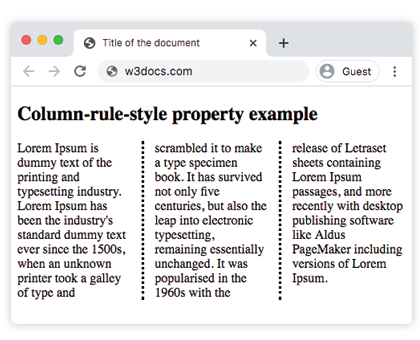
В следующем примере линии между колонками имеют двойной стиль. В этом примере цвет для линии задаётся с помощью свойства column-rule-color.
Пример свойства column-rule-style со значением "double":
Пример свойства CSS column-rule-style со значением double
<!DOCTYPE html>
<html>
  <head>
    <title>Title of the document</title>
    <style>
      div {
        column-count: 3;
        column-gap: 30px;
        column-rule-style: double;
        column-rule-color: #1c87c9;
        column-rule-width: 5px;
        text-align: justify;
      }
    </style>
  </head>
  <body>
    <h1>Column-rule-style property example</h1>
    <div>
      Lorem Ipsum is dummy text of the printing and typesetting industry. Lorem Ipsum has been the industry's standard dummy text ever since the 1500s, when an unknown printer took a galley of type and scrambled it to make a type specimen book. It has survived not only five centuries, but also the leap into electronic typesetting, remaining essentially unchanged. It was popularised in the 1960s with the release of Letraset sheets containing Lorem Ipsum passages, and more recently with desktop publishing software like Aldus PageMaker including versions of Lorem Ipsum.
    </div>
  </body>
</html>Значения
| Value | Description |
|---|---|
| none | Линия не задаётся. Это значение по умолчанию. |
| hidden | Линия скрыта. |
| dotted | Линия пунктирная. |
| dashed | Линия штриховая. |
| solid | Линия сплошная. |
| double | Линия двойная. |
| groove | Линия имеет 3D-эффект groove. Значения width и color определяют эффект. |
| ridge | Линия имеет 3D-эффект ridge. Значения width и color определяют эффект. |
| inset | Линия имеет 3D-эффект inset. Значения width и color определяют эффект. |
| outset | Линия имеет 3D-эффект outset. Значения width и color определяют эффект. |
| initial | Устанавливает свойство в значение по умолчанию. |
| inherit | Наследует свойство от родительского элемента. |
Practice
Какие из следующих утверждений верны о свойстве CSS column-rule-style?