Свойство CSS overflow-y
Свойство overflow-y определяет, должно ли содержимое быть скрыто, отображаться или прокручиваться по вертикали, когда оно выходит за верхнюю и нижнюю границы элемента. Это свойство является одним из свойств CSS3.
Свойство overflow-y имеет четыре основных значения: visible, hidden, auto и scroll.
INFO
Если для overflow-y задано значение visible, то значение overflow-x по умолчанию также будет установлено в visible. Если для overflow-y задано значение scroll, auto или hidden, значение overflow-x будет установлено в auto.
| Initial Value | visible |
|---|---|
| Applies to | Block-containers, flex containers and grid containers. |
| Inherited | No. |
| Animatable | No. |
| Version | CSS3 |
| DOM Syntax | object.style.overflowY = "auto"; |
INFO
Свойство overflow-x можно использовать для задания обрезки по правой и левой сторонам.
Синтаксис
CSS overflow-y
overflow-y: visible | hidden | scroll | auto | initial | inherit;Пример свойства overflow-y:
Пример кода CSS overflow-y
<!DOCTYPE html>
<html>
  <head>
    <title>Title of the document</title>
    <style>
      div.scroll {
        background-color: #1c87c9;
        color: #fff;
        height: 60px;
        width: 200px;
        overflow-y: scroll;
      }
    </style>
  </head>
  <body>
    <h2>Overflow-y property example</h2>
    <h3>Overflow-y: scroll</h3>
    <div class="scroll">Lorem Ipsum is simply dummy text of the printing and typesetting industry. Lorem Ipsum has been the industry's standard dummy text ever since the 1500s, when an unknown printer took a galley of type and scrambled it to make a type specimen book.</div>
  </body>
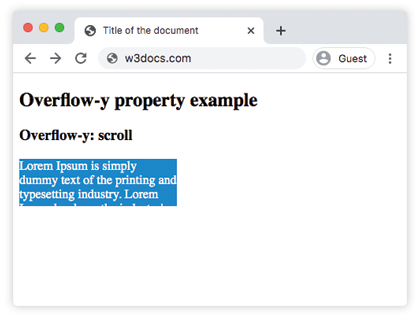
</html>Результат
Пример свойства overflow-y со значением "visible":
Пример CSS overflow-y visible
<!DOCTYPE html>
<html>
  <head>
    <title>Title of the document</title>
    <style>
      div.visible {
        background-color: #8ebf42;
        color: #666;
        height: 40px;
        width: 200px;
        overflow-y: visible;
      }
    </style>
  </head>
  <body>
    <h2>Overflow-y property example</h2>
    <h3>Overflow-y: visible</h3>
    <div class="visible">Lorem Ipsum is simply dummy text of the printing and typesetting industry. Lorem Ipsum has been the industry's standard dummy text ever since the 1500s, when an unknown printer took a galley of type and scrambled it to make a type specimen book.</div>
  </body>
</html>Пример свойства overflow-y со значением "hidden":
Пример CSS overflow-y hidden
<!DOCTYPE html>
<html>
  <head>
    <title>Title of the document</title>
    <style>
      div.hidden {
        background-color: #1c87c9;
        color: #fff;
        height: 60px;
        width: 200px;
        overflow-y: hidden;
      }
    </style>
  </head>
  <body>
    <h2>Overflow-y property example</h2>
    <h3>Overflow-y: hidden</h3>
    <div class="hidden">Lorem Ipsum is simply dummy text of the printing and typesetting industry. Lorem Ipsum has been the industry's standard dummy text ever since the 1500s, when an unknown printer took a galley of type and scrambled it to make a type specimen book.</div>
  </body>
</html>Пример свойства overflow-y со значением "auto":
Пример CSS overflow-y auto
<!DOCTYPE html>
<html>
  <head>
    <title>Title of the document</title>
    <style>
      div.auto {
        background-color: #1c87c9;
        color: #fff;
        height: 60px;
        width: 200px;
        overflow-y: auto;
      }
    </style>
  </head>
  <body>
    <h2>Overflow-y property example</h2>
    <h3>Overflow-y: auto</h3>
    <div class="auto">Lorem Ipsum is simply dummy text of the printing and typesetting industry. Lorem Ipsum has been the industry's standard dummy text ever since the 1500s, when an unknown printer took a galley of type and scrambled it to make a type specimen book.</div>
  </body>
</html>Пример свойства overflow-y со всеми значениями:
Пример CSS overflow-y со всеми значениями
<!DOCTYPE html>
<html>
  <head>
    <title>Title of the document</title>
    <style>
      div.scroll {
        background-color: #8ebf42;
        height: 70px;
        width: 150px;
        overflow-y: scroll;
      }
      div.hidden {
        background-color: #8ebf42;
        height: 70px;
        width: 150px;
        overflow-y: hidden;
      }
      div.auto {
        background-color: #8ebf42;
        height: 70px;
        width: 150px;
        overflow-y: auto;
      }
      div.visible {
        background-color: #8ebf42;
        height: 70px;
        width: 150px;
        overflow-y: visible;
      }
    </style>
  </head>
  <body>
    <h2>Overflow-y property example</h2>
    <h3>overflow-y: scroll</h3>
    <div class="scroll">
      Lorem Ipsum is simply dummy text of the printing and typesetting industry. Lorem Ipsum has been the industry's standard dummy text ever since the 1500s, when an unknown printer took a galley of type and scrambled it to make a type specimen book
    </div>
    <h3>overflow-y: hidden</h3>
    <div class="hidden">
      Lorem Ipsum is simply dummy text of the printing and typesetting industry. Lorem Ipsum has been the industry's standard dummy text ever since the 1500s, when an unknown printer took a galley of type and scrambled it to make a type specimen book.
    </div>
    <h3>overflow-y: auto</h3>
    <div class="auto">
      Lorem Ipsum is simply dummy text of the printing and typesetting industry. Lorem Ipsum has been the industry's standard dummy text ever since the 1500s, when an unknown printer took a galley of type and scrambled it to make a type specimen book.
    </div>
    <h3>overflow-y: visible</h3>
    <div class="visible">
      Lorem Ipsum is simply dummy text of the printing and typesetting industry. Lorem Ipsum has been the industry's standard dummy text ever since the 1500s, when an unknown printer took a galley of type and scrambled it to make a type specimen book.
    </div>
  </body>
</html>Значения
| Value | Description | Play it |
|---|---|---|
| visible | Содержимое не обрезается и отображается за верхней и нижней границами padding box. Это значение по умолчанию для этого свойства. | Play it » |
| hidden | Содержимое обрезается, чтобы поместиться по вертикали в padding box. Полоса прокрутки не добавляется. | Play it » |
| scroll | Содержимое обрезается, чтобы поместиться по вертикали в padding box. Полоса прокрутки добавляется, чтобы увидеть остальное содержимое. | Play it » |
| auto | Содержимое обрезается, чтобы поместиться по вертикали в padding box. Зависит от браузера. Если содержимое выходит за пределы, добавляется полоса прокрутки. | Play it » |
| initial | Заставляет свойство использовать значение по умолчанию. | Play it » |
| inherit | Наследует свойство от родительского элемента. |
Практика
Что делает свойство overflow-y в CSS?