Свойство CSS column-gap
Свойство column-gap задаёт длину промежутка между колонками.
Свойство column-gap является одним из свойств CSS3.
Оно принимает ключевое слово normal или значение <length>. normal используется по умолчанию. Промежуток может быть указан в em, px или процентах. Свойство также поддерживает стандартные ключевые слова initial и inherit.
INFO
Для современных браузеров больше не требуются вендорные префиксы. Нативная поддержка доступна во всех основных браузерах.
Если между колонками используется column-rule, она будет располагаться посередине промежутка.
| Начальное значение | normal |
|---|---|
| Применяется к | Элементам с несколькими колонками, flex контейнерам, grid контейнерам. |
| Наследуется | Нет. |
| Анимация | Да. Длина промежутка между колонками может анимироваться. |
| Версия | CSS3 |
| Синтаксис DOM | object.style.columnGap = "100px"; |
Синтаксис
Синтаксис свойства CSS column-gap
css
column-gap: length | normal | initial | inherit;Пример использования свойства column-gap:
Пример свойства CSS column-gap со значением normal
html
<!DOCTYPE html>
<html>
  <head>
    <title>Title of the document</title>
    <style>
      div {
        column-count: 4;
        column-gap: normal;
      }
    </style>
  </head>
  <body>
    <h2>The column-gap property example</h2>
    <div>
      Lorem Ipsum is dummy text of the printing and typesetting industry. Lorem Ipsum has been the industry's standard dummy text ever since the 1500s when an unknown printer took a galley of type and scrambled it to make a type specimen book. It has survived not only five centuries, but also the leap into electronic typesetting, remaining essentially unchanged. It was popularised in the 1960s with the release of Letraset sheets containing Lorem Ipsum passages, and more recently with desktop publishing software like Aldus PageMaker including versions of Lorem Ipsum.
    </div>
  </body>
</html>Результат
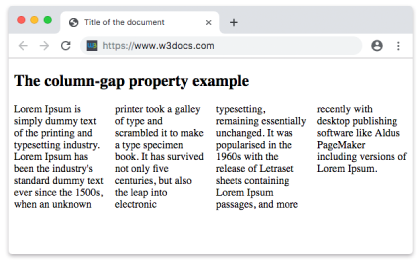
Пример свойства column-gap со значением «length»:
Пример свойства CSS column-gap со значением length
html
<!DOCTYPE html>
<html>
  <head>
    <title>Title of the document</title>
    <style>
      div {
        column-count: 4;
        column-gap: 30px;
      }
    </style>
  </head>
  <body>
    <h2>Column-gap property example</h2>
    <div>
      Lorem Ipsum is dummy text of the printing and typesetting industry. Lorem Ipsum has been the industry's standard dummy text ever since the 1500s when an unknown printer took a galley of type and scrambled it to make a type specimen book. It has survived not only five centuries, but also the leap into electronic typesetting, remaining essentially unchanged. It was popularised in the 1960s with the release of Letraset sheets containing Lorem Ipsum passages, and more recently with desktop publishing software like Aldus PageMaker including versions of Lorem Ipsum.
    </div>
  </body>
</html>Значения
| Значение | Описание |
|---|---|
| normal | Размер промежутка между колонками по умолчанию. |
| length | Задаёт длину промежутка между колонками. Может быть указан в em, px или процентах. |
| initial | Устанавливает свойству его значение по умолчанию. |
| inherit | Наследует свойство от родительского элемента. |
Практика
Какова цель свойства column-gap в CSS?