Свойство CSS margin-right
Свойство margin-right используется для определения размера правого отступа элемента.
INFO
Допускаются отрицательные значения.
| Начальное значение | 0 |
|---|---|
| Применяется к | Всем элементам. Также применяется к ::first-letter. |
| Наследуется | Нет. |
| Анимируется | Да. Правый отступ элемента может анимироваться. |
| Версия | CSS2 |
| Синтаксис DOM | object.style.marginRight = "50px"; |
Синтаксис
Синтаксис свойства CSS margin-right
css
margin-right: length | auto | initial | inherit;Пример свойства margin-right:
Пример использования свойства CSS margin-right со значением в пикселях
html
<!DOCTYPE html>
<html>
  <head>
    <title>Title of the document</title>
    <style>
      .right {
        margin-right: 400px;
      }
    </style>
  </head>
  <body>
    <h2>Margin-right property example</h2>
    <p>Lorem Ipsum is simply dummy text of the printing and typesetting industry.</p>
    <p class="right">Lorem Ipsum is simply dummy text of the printing and typesetting industry.</p>
  </body>
</html>Результат
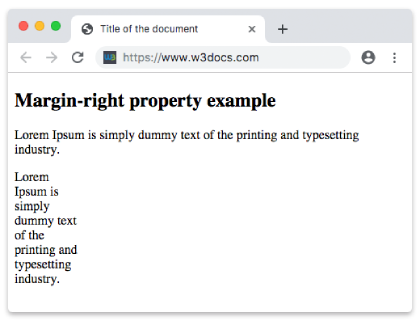
Пример свойства margin-right, заданного в "%":
Пример использования свойства CSS margin-right со значением в процентах
html
<!DOCTYPE html>
<html>
  <head>
    <title>Title of the document</title>
    <style>
      .right {
        margin-right: 50%;
      }
    </style>
  </head>
  <body>
    <h2>Margin-right property example</h2>
    <p>Lorem Ipsum is simply dummy text of the printing and typesetting industry.</p>
    <p class="right">Lorem Ipsum is simply dummy text of the printing and typesetting industry.</p>
  </body>
</html>Пример свойства margin-right со значением "auto":
Пример свойства margin-right со значением "auto":
html
<!DOCTYPE html>
<html>
  <head>
    <title>Title of the document</title>
    <style>
      .right {
        margin-right: auto;
      }
    </style>
  </head>
  <body>
    <h2>Margin-right property example</h2>
    <p>
      Lorem Ipsum is simply dummy text of the printing and typesetting industry. Lorem Ipsum is simply dummy text of the printing and typesetting industry.
    </p>
    <p class="right">
      Lorem Ipsum is simply dummy text of the printing and typesetting industry. Lorem Ipsum is simply dummy text of the printing and typesetting industry. Lorem Ipsum is simply dummy text of the printing and typesetting industry.
    </p>
  </body>
</html>Значения
| Значение | Описание | Запустить |
|---|---|---|
| auto | Устанавливает правый отступ. Это значение по умолчанию для данного свойства. | Запустить » |
| length | Определяет правый отступ в пикселях, пунктах, сантиметрах и т. д. Значение по умолчанию — 0. | Запустить » |
| % | Устанавливает правый отступ в % от размера родительского элемента. | Запустить » |
| initial | Заставляет свойство использовать значение по умолчанию. | Запустить » |
| inherit | Наследует свойство от родительского элемента. |
Практика
Что делает CSS-свойство 'margin-right'?