Свойство CSS column-width
Свойство column-width определяет ширину колонок. Браузер автоматически вычисляет необходимое количество колонок для отображения содержимого внутри элемента.
Свойство column-width является одним из свойств CSS3.
Оно принимает два значения: auto и length. auto — значение по умолчанию для свойства column-width. length задаёт ширину колонок в px, em и ch. Свойство column-width является гибким. Если контейнер недостаточно широк для размещения двух колонок с указанной шириной, содержимое перестроится в одну колонку. Если ширина блока меньше указанного значения, ширина единственной колонки будет меньше заданной ширины колонки. Обратите внимание, что если также указано column-count, то column-width действует как максимальная ширина, а браузер корректирует фактическое количество колонок в зависимости от доступного пространства контейнера.
С помощью этого свойства вы также можете создавать адаптивный дизайн для различных размеров экранов.
INFO
Современные браузеры поддерживают column-width без вендорных префиксов.
| Начальное значение | auto |
|---|---|
| Применяется к | Блочные контейнеры, кроме обёрток таблиц. |
| Наследуется | Нет. |
| Анимируется | Да. |
| Версия | CSS3 |
| Синтаксис DOM | object.style.columnWidth = "5px"; |
Синтаксис
Синтаксис свойства CSS column-width
column-width: auto | length | initial | inherit;Пример свойства column-width:
Пример использования свойства CSS column-width со значением length
<!DOCTYPE html>
<html>
  <head>
    <title>Title of the document</title>
    <style>
      div {
        column-width: 80px;
      }
    </style>
  </head>
  <body>
    <h1>Column-width property example</h1>
    <p>Here the width of the column is set to 80px.</p>
    <div>
      Lorem Ipsum is dummy text of the printing and typesetting industry. Lorem Ipsum has been the industry's standard dummy text ever since the 1500s when an unknown printer took a galley of type and scrambled it to make a type specimen book. It has survived not only five centuries, but also the leap into electronic typesetting, remaining essentially unchanged. It was popularised in the 1960s with the release of Letraset sheets containing Lorem Ipsum passages, and more recently with desktop publishing software like Aldus PageMaker including versions of Lorem Ipsum.
    </div>
  </body>
</html>Результат
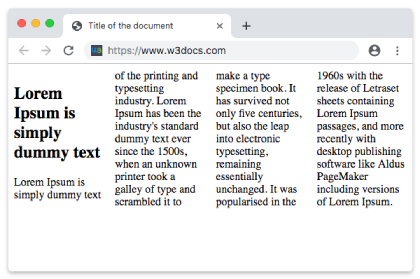
Пример свойства column-width со значением "auto":
Пример свойства column-width со значением "auto":
<!DOCTYPE html>
<html>
  <head>
    <title>Title of the document</title>
    <style>
      div {
        column-width: auto;
      }
    </style>
  </head>
  <body>
    <h1>Column-width property example</h1>
    <p>Here the width of the column is set to auto.</p>
    <div>
      Lorem Ipsum is dummy text of the printing and typesetting industry. Lorem Ipsum has been the industry's standard dummy text ever since the 1500s when an unknown printer took a galley of type and scrambled it to make a type specimen book. It has survived not only five centuries, but also the leap into electronic typesetting, remaining essentially unchanged. It was popularised in the 1960s with the release of Letraset sheets containing Lorem Ipsum passages, and more recently with desktop publishing software like Aldus PageMaker including versions of Lorem Ipsum.
    </div>
  </body>

</html>Значения
| Значение | Описание | Попробовать |
|---|---|---|
| auto | Ширина колонки определяется браузером. Это значение по умолчанию. | |
| length | Ширина колонок задаётся значением длины. | |
| initial | Устанавливает свойству его значение по умолчанию. | |
| inherit | Наследует свойство от родительского элемента. |
Практика
В чём назначение свойства 'column-width' в CSS?