Свойство CSS margin-bottom
Свойство margin-bottom используется для задания отступа снизу элемента.
INFO
Отрицательные значения допустимы.
INFO
Если используются неприводимые строчные элементы (например, <tt> или <span>), свойство CSS margin-bottom не окажет никакого эффекта.
| Начальное значение | 0 |
|---|---|
| Применяется к | Ко всем элементам. Также применяется к ::first-letter. |
| Наследуется | Нет. |
| Анимация | Да. Нижний отступ элемента может анимироваться. |
| Версия | CSS2 |
| Синтаксис DOM | object.style.marginBottom = "70px"; |
Синтаксис
Синтаксис свойства CSS margin-bottom
margin-bottom: length | auto | initial | inherit;Пример свойства margin-bottom:
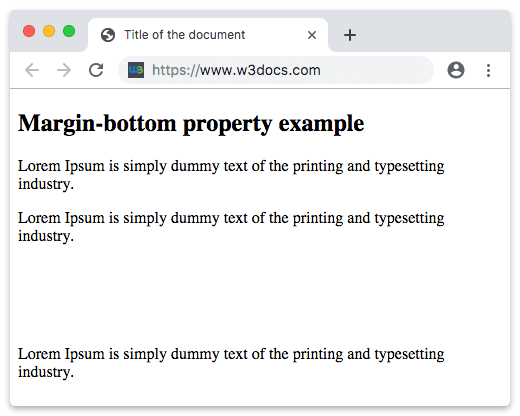
Пример свойства CSS margin-bottom со значением в пикселях
<!DOCTYPE html>
<html>
  <head>
    <title>Title of the document</title>
    <style>
      .bottom {
        margin-bottom: 100px;
      }
    </style>
  </head>
  <body>
    <h2>Margin-bottom property example</h2>
    <p>Lorem Ipsum is simply dummy text of the printing and typesetting industry.</p>
    <p class="bottom">Lorem Ipsum is simply dummy text of the printing and typesetting industry.</p>
    <p>Lorem Ipsum is simply dummy text of the printing and typesetting industry.</p>
  </body>
</html>Результат
Пример свойства margin-bottom, заданного как "4em":
Пример свойства CSS margin-bottom со значением в em
<!DOCTYPE html>
<html>
  <head>
    <title>Title of the document</title>
    <style>
      .bottom {
        margin-bottom: 4em;
      }
    </style>
  </head>
  <body>
    <h2>Margin-bottom property example</h2>
    <p>Lorem Ipsum is simply dummy text of the printing and typesetting industry.</p>
    <p class="bottom">Lorem Ipsum is simply dummy text of the printing and typesetting industry.</p>
    <p>Lorem Ipsum is simply dummy text of the printing and typesetting industry.</p>
  </body>
</html>Пример свойства margin-bottom, заданного в "px", "em" и "%":
Пример свойства CSS margin-bottom со значениями в px, em и %
<!DOCTYPE html>
<html>
  <head>
    <title>Title of the document</title>
    <style>
      p.p1 {
        margin-bottom: 5em;
      }
      p.p2 {
        margin-bottom: 20%;
      }
      p.p3 {
        margin-bottom: 20px;
      }
    </style>
  </head>
  <body>
    <h2>Margin-bottom property example</h2>
    <p>A paragraph with no margins specified.</p>
    <p class="p1">Bottom margin is set to 5em.</p>
    <p class="p2">Bottom margin is set to 20%.</p>
    <p class="p3">Bottom margin is set to 20px.</p>
    <p>A paragraph with no margins specified.</p>
  </body>
</html>Схлопывание отступов
В некоторых случаях верхний и нижний отступы могут схлопнуться в один, равный большему из этих двух отступов. Это может происходить только с вертикальными (верхним и нижним) отступами.
Схлопывание отступов
p.one {
  margin: 20px 0;
}

p.two {
  margin: 35px 0;
}
В приведенном выше примере кода элемент <p class="one"> имеет вертикальный отступ 20px. Элемент <p class="two"> имеет вертикальный отступ 35px. Может показаться, что вертикальный отступ между этими двумя элементами должен составлять 55px. Однако в результате схлопывания отступов фактический отступ составит 35px.
Пример схлопывания отступов:
Пример схлопывания отступов
<!DOCTYPE html>
<html>
  <head>
    <title>Title of the document</title>
    <style>
      p.one {
        margin: 20px 0;
      }
      p.two {
        margin: 35px 0;
      }
    </style>
  </head>
  <body>
    <h2>Margin-bottom property example</h2>
    <p>Lorem Ipsum is simply dummy text of the printing and typesetting industry.</p>
    <p class="one">Lorem Ipsum is simply dummy text of the printing and typesetting industry.</p>
    <p class="two">Lorem Ipsum is simply dummy text of the printing and typesetting industry.</p>
    <p>Lorem Ipsum is simply dummy text of the printing and typesetting industry.</p>
  </body>
</html>Значения
| Значение | Описание | Запустить |
|---|---|---|
| auto | Устанавливает нижний отступ. Это значение по умолчанию для данного свойства. | Запустить » |
| length | Определяет нижний отступ в px, pt, cm и т. д. Значение по умолчанию — 0. | Запустить » |
| % | Устанавливает нижний отступ в % от размера содержащего элемента. | Запустить » |
| initial | Заставляет свойство использовать значение по умолчанию. | Запустить » |
| inherit | Наследует свойство от родительского элемента. |
Практика
В чем функция свойства 'margin-bottom' в CSS?