Свойство CSS justify-content
Свойство justify-content выравнивает элементы, когда они не занимают всё доступное пространство вдоль главной оси. Оно управляет выравниванием элементов, выходящих за пределы строки. Это свойство является подсвойством модуля Flexible Box Layout.
Свойство justify-content входит в число свойств CSS3.
INFO
Свойство justify-content следует использовать вместе со свойством display, установленным в значение "flex". Для вертикального выравнивания элементов используйте свойство align-items.
| Начальное значение | flex-start |
|---|---|
| Применяется к | Flex-контейнеры. |
| Наследуется | Нет. |
| Анимация | Нет. |
| Версия | CSS3 |
| Синтаксис DOM | object.style.justifyContent = "center"; |
Синтаксис
Синтаксис CSS justify-content
css
justify-content: flex-start | flex-end | center | space-between | space-around | space-evenly | initial | inherit;Пример свойства justify-content:
Пример кода CSS justify-content
html
<!DOCTYPE html>
<html>
  <head>
    <title>Title of the document </title>
    <style>
      .center {
        width: 400px;
        height: 150px;
        border: 1px solid #666;
        display: flex;
        justify-content: center;
      }
      .center div {
        width: 70px;
        height: 70px;
        background-color: #ccc;
        border: 1px solid #666;
      }
    </style>
  </head>
  <body>
    <h2>Justify-content property example</h2>
    <p>Here the "justify-content: center" is set:</p>
    <div class="center">
      <div>1</div>
      <div>2</div>
      <div>3</div>
    </div>
  </body>
</html>Результат
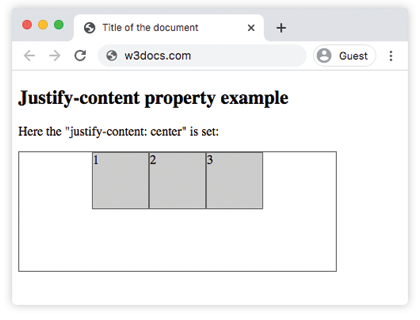
Пример свойства justify-content со значением "flex-start":
Пример CSS justify-content flex-start
html
<!DOCTYPE html>
<html>
  <head>
    <title>Title of the document </title>
    <style>
      .start {
        width: 400px;
        height: 150px;
        border: 1px solid #666;
        display: flex;
        justify-content: flex-start;
      }
      .start div {
        width: 70px;
        height: 70px;
        background-color: #ccc;
        border: 1px solid #666;
      }
    </style>
  </head>
  <body>
    <h2>Justify-content property example</h2>
    <p>Here the "justify-content: flex-start" is set:</p>
    <div class="start">
      <div>1</div>
      <div>2</div>
      <div>3</div>
    </div>
  </body>
</html>Пример свойства justify-content со значением "flex-end":
Пример CSS justify-content flex-end
html
<!DOCTYPE html>
<html>
  <head>
    <title>Title of the document </title>
    <style>
      .end {
        width: 400px;
        height: 150px;
        border: 1px solid #666;
        display: flex;
        justify-content: flex-end;
      }
      .end div {
        width: 70px;
        height: 70px;
        background-color: #ccc;
        border: 1px solid #666;
      }
    </style>
  </head>
  <body>
    <h2>Justify-content property example</h2>
    <p>Here the "justify-content: flex-end" is set:</p>
    <div class="end">
      <div>1</div>
      <div>2</div>
      <div>3</div>
    </div>
  </body>
</html>Пример свойства justify-content со значением "space-between":
Пример CSS justify-content space-between
html
<!DOCTYPE html>
<html>
  <head>
    <title>Title of the document </title>
    <style>
      .space-between {
        width: 400px;
        height: 150px;
        border: 1px solid #666;
        display: flex;
        justify-content: space-between;
      }

      .space-between div {
        width: 70px;
        height: 70px;
        background-color: #ccc;
        border: 1px solid #666;
      }
    </style>
  </head>
  <body>
    <h2>Justify-content property example</h2>
    <p>Here the "justify-content: space-between" is set:</p>
    <div class="space-between">
      <div>1</div>
      <div>2</div>
      <div>3</div>
    </div>
  </body>
</html>Пример свойства justify-content со значением "space-around":
Пример CSS justify-content space-around
html
<!DOCTYPE html>
<html>
  <head>
    <title>Title of the document </title>
    <style>
      .space-around {
        width: 400px;
        height: 150px;
        border: 1px solid #666;
        display: flex;
        justify-content: space-around;
      }
      .space-around div {
        width: 70px;
        height: 70px;
        background-color: #ccc;
        border: 1px solid #666;
      }
    </style>
  </head>
  <body>
    <h2>Justify-content property example</h2>
    <p>Here the "justify-content: space-around" is used:</p>
    <div class="space-around">
      <div>1</div>
      <div>2</div>
      <div>3</div>
    </div>
  </body>
</html>Значения
| Значение | Описание | Запустить |
|---|---|---|
| flex-start | Элементы начинаются с начала контейнера. | Запустить » |
| flex-end | Элементы размещаются в конце контейнера. | Запустить » |
| center | Элементы размещаются в центре контейнера. | Запустить » |
| space-around | Пространство есть до, между и после элементов. | Запустить » |
| space-between | Пространство есть только между элементами. | Запустить » |
| space-evenly | Равное пространство до, между и после элементов. | Запустить » |
| initial | Заставляет свойство использовать значение по умолчанию. | Запустить » |
| inherit | Наследует свойство от родительского элемента. |
Практика
Что делает свойство 'justify-content' в CSS?