Свойство CSS flex-direction
Свойство flex-direction определяет главную ось flex-контейнера и задаёт порядок расположения flex-элементов. Это одно из свойств CSS3. Данное свойство входит в модуль Flexible Box Layout.
Flex-элементы могут располагаться:
- горизонтально слева направо (
flex-direction: row) или справа налево (flex-direction: row-reverse) - вертикально сверху вниз (
flex-direction: column) или снизу вверх (flex-direction: column-reverse)
INFO
Если гибкие элементы отсутствуют, свойство flex-direction не оказывает никакого эффекта.
| Начальное значение | row |
|---|---|
| Применяется к | Flex-контейнеры. |
| Наследуется | Нет. |
| Анимация | Нет. |
| Версия | CSS3 |
| Синтаксис DOM | object.style.flexDirection = "row-reverse"; |
Синтаксис
Синтаксис свойства CSS flex-direction
flex-direction: row | row-reverse | column | column-reverse | initial | inherit;Пример свойства flex-direction:
Пример использования свойства CSS flex-direction со значением column-reverse
<!DOCTYPE html>
<html>
  <head>
    <title>Title of the document</title>
    <style>
      .example {
        width: 350px;
        height: 350px;
        border: 1px solid #c3c3c3;
        display: flex;
        flex-direction: column-reverse;
      }
      .example div {
        width: 70px;
        height: 70px;
      }
    </style>
  </head>
  <body>
    <h2>Flex-direction property example</h2>
    <div class="example">
      <div style="background-color: #8ebf42;">A</div>
      <div style="background-color: #1c87c9;">B</div>
      <div style="background-color: #eeeeee;">C</div>
      <div style="background-color: #666666;">F</div>
    </div>
  </body>
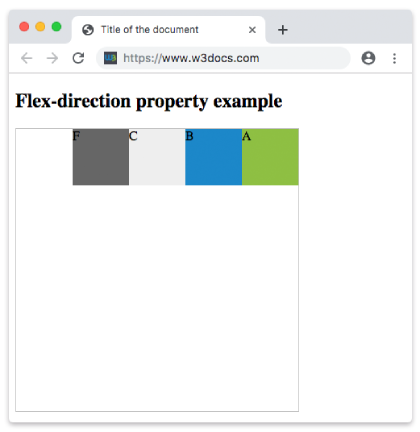
</html>В следующем примере элементы отображаются горизонтально в виде строки справа налево.
Пример свойства flex-direction со значением "row-reverse":
Пример свойства CSS flex-direction со значением row-reverse
<!DOCTYPE html>
<html>
  <head>
    <title>Title of the document</title>
    <style>
      .example {
        width: 350px;
        height: 350px;
        border: 1px solid #c3c3c3;
        display: flex;
        flex-direction: row-reverse;
      }
      .example div {
        width: 70px;
        height: 70px;
      }
    </style>
  </head>
  <body>
    <h2>Flex-direction property example</h2>
    <div class="example">
      <div style="background-color: #8ebf42;">A</div>
      <div style="background-color: #1c87c9;">B</div>
      <div style="background-color: #eeeeee;">C</div>
      <div style="background-color: #666666;">F</div>
    </div>
  </body>
</html>Результат
На следующем изображении показаны элементы, расположенные в обратном порядке справа налево.
Пример свойства flex-direction со значением "row":
Пример свойства flex-direction со значением «row»
<!DOCTYPE html>
<html>
  <head>
    <title>Title of the document</title>
    <style>
      .example {
        width: 350px;
        height: 350px;
        border: 1px solid #c3c3c3;
        display: flex;
        flex-direction: row;
      }
      .example div {
        width: 70px;
        height: 70px;
      }
    </style>
  </head>
  <body>
    <h2>Flex-direction property example</h2>
    <div class="example">
      <div style="background-color: #8ebf42;">A</div>
      <div style="background-color: #1c87c9;">B</div>
      <div style="background-color: #eeeeee;">C</div>
      <div style="background-color: #666666;">F</div>
    </div>
  </body>
</html>Пример свойства flex-direction со значением "column":
Пример свойства flex-direction со значением «column»
<!DOCTYPE html>
<html>
  <head>
    <title>Title of the document</title>
    <style>
      .example {
        width: 350px;
        height: 350px;
        border: 1px solid #c3c3c3;
        display: flex;
        flex-direction: column;
      }
      .example div {
        width: 70px;
        height: 70px;
      }
    </style>
  </head>
  <body>
    <h2>Flex-direction property example</h2>
    <div class="example">
      <div style="background-color: #DC143C;">A</div>
      <div style="background-color: #0000CD;">B</div>
      <div style="background-color: #9ACD32;">C</div>
      <div style="background-color: #666666;">F</div>
    </div>
  </body>
</html>Пример свойства flex-direction со значением "column-reverse":
Пример свойства flex-direction со значением «column-reverse»
<!DOCTYPE html>
<html>
  <head>
    <title>Title of the document</title>
    <style>
      .example {
        width: 350px;
        height: 340px;
        border: 1px solid #c3c3c3;
        display: flex;
        flex-direction: column-reverse;
      }
      .example div {
        width: 60px;
        height: 60px;
      }
    </style>
  </head>
  <body>
    <h2>Flex-direction property example</h2>
    <div class="example">
      <div style="background-color: #DC143C;">A</div>
      <div style="background-color: #0000CD;">B</div>
      <div style="background-color: #9ACD32;">C</div>
      <div style="background-color: #666666;">F</div>
    </div>
  </body>
</html>Значения
| Значение | Описание | Запустить |
|---|---|---|
| row | Элементы отображаются горизонтально в виде строки. Это значение по умолчанию. | Запустить » |
| row-reverse | Элементы отображаются в строку в обратном порядке (справа налево). | Запустить » |
| column | Элементы отображаются вертикально сверху вниз. | Запустить » |
| column-reverse | Элементы отображаются вертикально снизу вверх. | Запустить » |
| initial | Свойство использует значение по умолчанию. | Запустить » |
| inherit | Свойство наследует значение от родительского элемента. | Запустить » |
Практика
Какие из перечисленных являются допустимыми значениями для свойства CSS flex-direction?