Свойство CSS text-align-last
Свойство CSS text-align-last задаёт выравнивание последней строки текста. Узнайте о значениях свойства и посмотрите примеры.
CSS-свойство text-align-last задаёт выравнивание последней строки блока текста — и только последней. Это одно из свойств CSS3, которое работает в связке с обычным свойством text-align.
Когда вы выравниваете абзац по ширине с помощью text-align: justify, каждая строка растягивается до полной ширины — кроме последней, которая по умолчанию остаётся короткой и выровненной по началу. Свойство text-align-last определяет, что происходит с этой финальной «рваной» строкой.
Свойство воздействует на последнюю отформатированную строку блочного контейнера, к которому оно применено. Например, если <div> содержит длинный обтекаемый текст, text-align-last стилизует единственную строку в самом низу — оставшиеся слова, не заполнившие полную строку.
Это свойство наиболее заметно при использовании text-align: justify, когда текст переносится на несколько строк. В случае однострочного текста последняя строка является единственной, поэтому поведение идентично text-align.
Когда использовать
Используйте text-align-last, когда выровненный по ширине текст оставляет неудобную последнюю строку и вам нужен больший контроль над ней:
justify— принудительно растягивает последнюю строку на всю ширину, чтобы абзац образовывал ровный прямоугольный блок (распространено в макетах в стиле печати и на плакатах).center— даёт выровненному по ширине блоку центрированную завершающую строку; часто используется для коротких заголовков или цитат.right/end— сдвигает последнюю строку к противоположному краю для намеренного асимметричного вида.
Поскольку свойство наследуется, его однократная установка на обёртке применяется ко всем блочным контейнерам внутри, если дочерний элемент не переопределит его.
| Начальное значение | auto |
|---|---|
| Применяется к | Блочным контейнерам. |
| Наследуется | Да. |
| Анимируемо | Нет. |
| Версия | CSS3 |
| DOM Syntax | object.style.textAlignLast = "left"; |
Совместимость с браузерами
| Браузер | Поддержка |
|---|---|
| Chrome | 50+ |
| Edge | 12+ |
| Firefox | 49+ |
| Safari | 10.1+ |
| Opera | 37+ |
Синтаксис
Синтаксис CSS text-align-last
text-align-last: auto | left | right | center | justify | start | end | initial | inherit;Пример свойства text-align-last:
Пример кода CSS text-align-last
<!DOCTYPE html>
<html>
  <head>
    <title>Title of the document</title>
    <style>
      .demo {
        text-align: justify;
        text-align-last: right;
      }
    </style>
  </head>
  <body>
    <h2>Text-align-last property example</h2>
    <h3>text-align-last: right:</h3>
    <div class="demo">
      Lorem Ipsum is dummy text of the printing and typesetting industry. Lorem Ipsum has been the industry's standard dummy text ever since the 1500s when an unknown printer took a galley of type and scrambled it to make a type specimen book. It has survived not only five centuries, but also the leap into electronic typesetting, remaining essentially unchanged. It was popularised in the 1960s with the release of Letraset sheets containing Lorem Ipsum passages, and more recently with desktop publishing software like Aldus PageMaker including versions of Lorem Ipsum.
    </div>
  </body>
</html>Результат
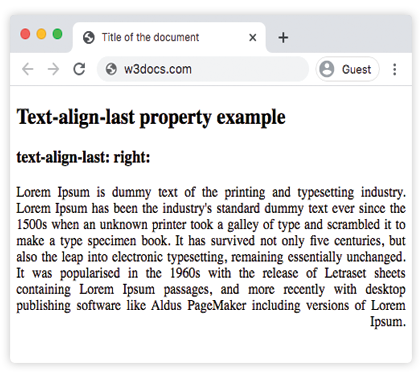
Пример свойства text-align-last со значениями "start", "justify" и "center":
Пример CSS text-align-last со всеми значениями
<!DOCTYPE html>
<html>
  <head>
    <title>Title of the document</title>
    <style>
      .demo1 {
        text-align: justify;
        text-align-last: start;
      }
      .demo2 {
        text-align: justify;
        text-align-last: center;
      }
      .demo3 {
        text-align: justify;
        text-align-last: justify;
      }
    </style>
  </head>
  <body>
    <h2>Text-align-last property example</h2>
    <h3>Text-align-last: start:</h3>
    <div class="demo1">
      Lorem Ipsum is dummy text of the printing and typesetting industry. Lorem Ipsum has been the industry's standard dummy text ever since the 1500s when an unknown printer took a galley of type and scrambled it to make a type specimen book. It has survived not only five centuries, but also the leap into electronic typesetting, remaining essentially unchanged. It was popularised in the 1960s with the release of Letraset sheets containing Lorem Ipsum passages, and more recently with desktop publishing software like Aldus PageMaker including versions of Lorem Ipsum.
    </div>
    <h3>Text-align-last: center:</h3>
    <div class="demo2">
      Lorem Ipsum is dummy text of the printing and typesetting industry. Lorem Ipsum has been the industry's standard dummy text ever since the 1500s when an unknown printer took a galley of type and scrambled it to make a type specimen book. It has survived not only five centuries, but also the leap into electronic typesetting, remaining essentially unchanged. It was popularised in the 1960s with the release of Letraset sheets containing Lorem Ipsum passages, and more recently with desktop publishing software like Aldus PageMaker including versions of Lorem Ipsum.
    </div>
    <h3>Text-align-last: justify:</h3>
    <div class="demo3">
      Lorem Ipsum is dummy text of the printing and typesetting industry. Lorem Ipsum has been the industry's standard dummy text ever since the 1500s when an unknown printer took a galley of type and scrambled it to make a type specimen book. It has survived not only five centuries, but also the leap into electronic typesetting, remaining essentially unchanged. It was popularised in the 1960s with the release of Letraset sheets containing Lorem Ipsum passages, and more recently with desktop publishing software like Aldus PageMaker including versions of Lorem Ipsum.
    </div>
  </body>
</html>Пример свойства text-align-last со значением "end":
Обратите внимание, что text-align-last применяется к обёрточному элементу <div>, но каждый <p> внутри является самостоятельным блочным контейнером — поэтому выравнивание end воздействует на последнюю строку каждого абзаца, а не только на последний абзац группы.
<!DOCTYPE html>
<html>
  <head>
    <title>Title of the document</title>
    <style>
      .demo {
        text-align: justify;
        text-align-last: end;
      }
    </style>
  </head>
  <body>
    <h2>Text-align-last property example</h2>
    <h3>text-align-last: end:</h3>
    <div class="demo">
      <p>
        Lorem Ipsum is dummy text of the printing and typesetting industry. Lorem Ipsum has been the industry's standard dummy text ever since the 1500s when an unknown printer took a galley of type and scrambled it to make a type specimen book. It has survived not only five centuries, but also the leap into electronic typesetting, remaining essentially unchanged. It was popularised in the 1960s with the release of Letraset sheets containing Lorem Ipsum passages, and more recently with desktop publishing software like Aldus PageMaker including versions of Lorem Ipsum.
      </p>
      <p>
        Lorem Ipsum is dummy text of the printing and typesetting industry. Lorem Ipsum has been the industry's standard dummy text ever since the 1500s when an unknown printer took a galley of type and scrambled it to make a type specimen book. It has survived not only five centuries, but also the leap into electronic typesetting, remaining essentially unchanged.
      </p>
      <p>
        Lorem Ipsum is dummy text of the printing and typesetting industry. Lorem Ipsum has been the industry's standard dummy text ever since the 1500s when an unknown printer took a galley of type and scrambled it to make a type specimen book.
      </p>
    </div>
  </body>
</html>Значения
| Значение | Описание |
|---|---|
| auto | Использует значение свойства text-align. Это значение по умолчанию. |
| left | Выравнивает последнюю строку по левому краю. |
| right | Выравнивает последнюю строку по правому краю. |
| center | Выравнивает последнюю строку по центру. |
| justify | Последняя строка выравнивается по ширине, как и остальные строки. |
| start | Последняя строка выравнивается по началу строки. По левому краю при направлении слева направо и по правому — при направлении справа налево. |
| end | Последняя строка выравнивается по концу строки. По правому краю при направлении слева направо, по левому — при направлении справа налево. |
| initial | Устанавливает для свойства значение по умолчанию. |
| inherit | Наследует значение свойства от родительского элемента. |
Практика
Связанные свойства
text-align— выравнивает все строки блока текста.text-justify— управляет распределением пространства при выравнивании текста по ширине.direction— задаёт направление текста, определяя, что означаютstartиend.