CSS свойство column-rule-color
Свойство CSS column-rule-color задаёт цвет разделителя между колонками. Примеры и настройка цветов.
CSS-свойство column-rule-color задаёт цвет разделителя (линии-делителя), отрисовываемого между колонками многоколоночного макета. Сам разделитель создаётся с помощью column-rule-style; если стиль не задан, разделитель — и его цвет — не отображается.
Свойство действует только на многоколоночные элементы, то есть на элементы, разбитые на колонки с помощью column-count или column-width (либо сокращённого свойства columns). Оно относится к свойствам CSS3.
Цвет разделителя можно также задать вместе с его шириной и стилем через сокращённое свойство column-rule, которое является наиболее распространённым способом указать все три значения сразу.
По умолчанию значение равно currentColor, поэтому цвет неустановленного разделителя совпадает со значением color текста элемента. Веб-цвета можно найти в разделе HTML colors, а выбрать собственный — с помощью инструмента Color Picker.
Когда использовать
Используйте column-rule-color, когда хотите, чтобы разделитель между колонками отличался по цвету от текста — например, ненавязчивый серый разделитель между строками тёмного основного текста или акцентная линия в цветах бренда. Поскольку разделитель является чисто декоративным, он не занимает пространство в макете (он располагается внутри column-gap), поэтому изменение его цвета никогда не вызывает перерасчёт потока содержимого.
| Начальное значение | currentColor |
|---|---|
| Применяется к | Многоколоночным элементам. |
| Наследуется | Нет. |
| Анимируется | Да. Цвет разделителя поддаётся анимации. |
| Версия | CSS3 |
| DOM Синтаксис | object.style.columnRuleColor = "#666"; |
Синтаксис
Синтаксис CSS-свойства column-rule-color
column-rule-color: color | initial | inherit;Можно передать любой допустимый CSS-цвет: именованный цвет, шестнадцатеричный код, а также значение rgb(), rgba(), hsl() или hsla().
Примеры
Именованный цвет
Пример CSS-свойства column-rule-color со значением lightgreen
<!DOCTYPE html>
<html>
  <head>
    <title>Title of the document</title>
    <style>
      div {
        column-count: 3;
        column-gap: 20px;
        column-rule-style: dashed;
        column-rule-color: lightgreen;
      }
    </style>
  </head>
  <body>
    <h1>The column-rule-color example</h1>
    <div>
      Lorem Ipsum is dummy text of the printing and typesetting industry. Lorem Ipsum has been the industry's standard dummy text ever since the 1500s when an unknown printer took a galley of type and scrambled it to make a type specimen book. It has survived not only five centuries, but also the leap into electronic typesetting, remaining essentially unchanged. It was popularised in the 1960s with the release of Letraset sheets containing Lorem Ipsum passages, and more recently with desktop publishing software like Aldus PageMaker including versions of Lorem Ipsum.
    </div>
  </body>
</html>Не забудьте также задать column-rule-style — без стиля (например, solid, dashed или double) разделитель не отрисовывается, и его цвет не оказывает никакого видимого эффекта.
Шестнадцатеричное значение
Пример CSS-свойства column-rule-color с шестнадцатеричным значением
<!DOCTYPE html>
<html>
  <head>
    <title>Title of the document</title>
    <style>
      div {
        column-count: 3;
        column-gap: 40px;
        column-rule-style: solid;
        column-rule-color: #8ebf42;
      }
    </style>
  </head>
  <body>
    <h1>The column-rule-color example</h1>
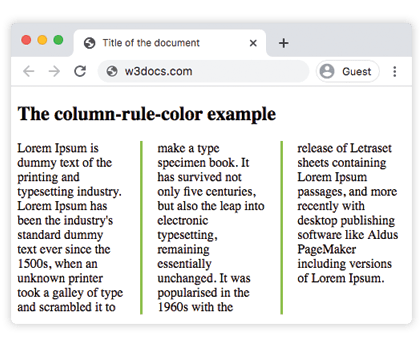
    <div>
      Lorem Ipsum is dummy text of the printing and typesetting industry. Lorem Ipsum has been the industry's standard dummy text ever since the 1500s, when an unknown printer took a galley of type and scrambled it to make a type specimen book. It has survived not only five centuries, but also the leap into electronic typesetting, remaining essentially unchanged. It was popularised in the 1960s with the release of Letraset sheets containing Lorem Ipsum passages, and more recently with desktop publishing software like Aldus PageMaker including versions of Lorem Ipsum.
    </div>
  </body>
</html>Результат:
Значение RGB
Пример CSS-свойства column-rule-color со значением RGB
<!DOCTYPE html>
<html>
  <head>
    <title>Title of the document</title>
    <style>
      div {
        column-count: 3;
        column-gap: 40px;
        column-rule-style: double;
        column-rule-color: rgb(234, 211, 21);
      }
    </style>
  </head>
  <body>
    <h1>The column-rule-color example</h1>
    <div>
      Lorem Ipsum is dummy text of the printing and typesetting industry. Lorem Ipsum has been the industry's standard dummy text ever since the 1500s, when an unknown printer took a galley of type and scrambled it to make a type specimen book. It has survived not only five centuries, but also the leap into electronic typesetting, remaining essentially unchanged. It was popularised in the 1960s with the release of Letraset sheets containing Lorem Ipsum passages, and more recently with desktop publishing software like Aldus PageMaker including versions of Lorem Ipsum.
    </div>
  </body>
</html>Значение HSL
Пример CSS-свойства column-rule-color со значением HSL
<!DOCTYPE html>
<html>
  <head>
    <title>Title of the document</title>
    <style>
      div {
        column-count: 3;
        column-gap: 30px;
        column-rule-style: solid;
        column-rule-color: hsl(351, 97%, 57%);
      }
    </style>
  </head>
  <body>
    <h1>The column-rule-color example</h1>
    <div>
      Lorem Ipsum is dummy text of the printing and typesetting industry. Lorem Ipsum has been the industry's standard dummy text ever since the 1500s, when an unknown printer took a galley of type and scrambled it to make a type specimen book. It has survived not only five centuries, but also the leap into electronic typesetting, remaining essentially unchanged. It was popularised in the 1960s with the release of Letraset sheets containing Lorem Ipsum passages, and more recently with desktop publishing software like Aldus PageMaker including versions of Lorem Ipsum.
    </div>
  </body>
</html>Значения
| Значение | Описание | Попробовать |
|---|---|---|
| color | Задаёт цвет разделителя. Можно использовать именованные цвета, шестнадцатеричные коды, rgb(), rgba(), hsl(), hsla(). | |
| initial | Устанавливает свойство в значение по умолчанию. | |
| inherit | Наследует свойство от родительского элемента. |
Связанные свойства
Разделитель колонок управляется тремя развёрнутыми свойствами, обычно объединяемыми в сокращённое:
column-rule— сокращённое свойство для одновременной установки стиля, ширины и цвета.column-rule-style— стиль линии; необходим для отображения разделителя (и его цвета).column-rule-width— толщина разделителя.
Смотрите также column-gap, которое определяет пространство, в котором располагается разделитель, и сокращённое свойство columns для построения самого многоколоночного макета.