CSS-свойство float
Свойство CSS float определяет, должен ли элемент плавать или нет. Примеры и практика.
Свойство CSS float извлекает элемент из обычного потока документа и прижимает его к левому или правому краю контейнера, позволяя последующему тексту и строчному содержимому обтекать его. Изначально оно создавалось для обтекания текстом изображений (как в журнальной вёрстке), и сегодня это по-прежнему его наиболее наглядное применение.
На этой странице рассматривается, что делает float, его значения, как оно взаимодействует со свойством clear, проблема «схлопывания родителя» и исправление с помощью clearfix, а также когда лучше использовать Flexbox.
Когда элемент плавающий:
- Он извлекается из обычного потока, поэтому блочные элементы после него смещаются вверх, заполняя освободившееся место.
- Строчное содержимое (текст, строчные изображения) обтекает плавающий элемент с его стороны.
- Плавающий элемент сжимается по размеру своего содержимого, если вы не задаёте ему явную
width.
Свойство clear является естественным дополнением к float: оно указывает элементу располагаться ниже предшествующих плавающих элементов, а не рядом с ними.
Свойство float игнорируется на абсолютно позиционированных элементах (position: absolute или position: fixed), поскольку они уже извлечены из обычного потока.
| Начальное значение | none |
|---|---|
| Применяется к | Всем элементам. |
| Наследуется | Нет. |
| Анимируемое | Нет. |
| Версия | CSS1 |
| DOM-синтаксис | object.style.cssFloat = "right"; |
Синтаксис
Синтаксис CSS-свойства float
float: none | left | right | initial | inherit;Пример свойства float:
Пример CSS-свойства float со значением right
<!DOCTYPE html>
<html>
  <head>
    <title>Title of the document</title>
    <style>
      img {
        float: right;
        background: #ccc;
      }
    </style>
  </head>
  <body>
    <h2>Float property example</h2>
    <img src="/uploads/media/default/0001/01/003e5c463668d174ab70bea245c192d81901a4a6.png" alt="W3dcos" />
    <p>
      Lorem Ipsum is simply dummy text of the printing and typesetting industry. Lorem Ipsum has been the industry's standard dummy text ever since the 1500s, when an unknown printer took a galley of type and scrambled it to make a type specimen book. It has survived not only five centuries, but also the leap into electronic typesetting, remaining essentially unchanged.
    </p>
  </body>
</html>Результат
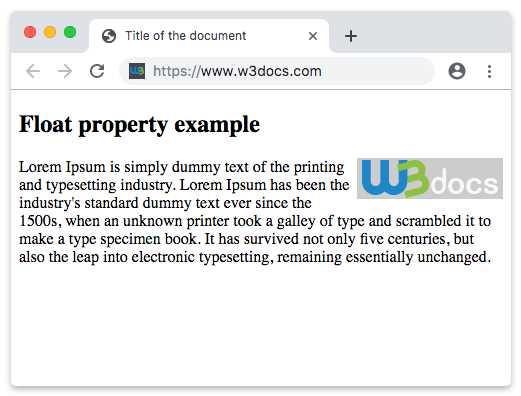
В следующем примере изображение плавает влево, поэтому текст абзаца обтекает его с правого края.
Пример использования свойства float для плавания изображения:
Пример CSS-свойства float со значением left
<!DOCTYPE html>
<html>
  <head>
    <title>Title of the document</title>
    <style>
      img {
        float: left;
        background: #ccc;
      }
    </style>
  </head>
  <body>
    <h2>Float property example</h2>
    <img src="/uploads/media/default/0001/01/003e5c463668d174ab70bea245c192d81901a4a6.png" alt="W3dcos" />
    <p>
      Lorem Ipsum is simply dummy text of the printing and typesetting industry. Lorem Ipsum has been the industry's standard dummy text ever since the 1500s, when an unknown printer took a galley of type and scrambled it to make a type specimen book. It has survived not only five centuries, but also the leap into electronic typesetting, remaining essentially unchanged.
    </p>
  </body>
</html>Значения
| Значение | Описание | Попробуйте |
|---|---|---|
| none | Означает, что элемент не плавает и отображается там, где он находится в тексте. Это значение по умолчанию. | Попробуйте » |
| left | Означает, что элемент плавает влево. | Попробуйте » |
| right | Означает, что элемент плавает вправо. | Попробуйте » |
| initial | Устанавливает значение свойства по умолчанию. | Попробуйте » |
| inherit | Наследует значение свойства от родительского элемента. |
Проблема схлопывания родителя
Плавающий элемент извлекается из обычного потока, поэтому его родитель больше не учитывает его при вычислении собственной высоты. Если контейнер содержит только плавающих потомков, он схлопывается до нулевой высоты — фоны и границы исчезают, а последующее содержимое может подняться под плавающие элементы.
<!DOCTYPE html>
<html>
  <head>
    <style>
      .box { border: 2px solid #1a7e3c; }
      .box img { float: left; }
    </style>
  </head>
  <body>
    <!-- The border collapses around the floated image -->
    <div class="box">
      <img src="logo.png" alt="logo" width="80" height="80" />
    </div>
  </body>
</html>Исправление с помощью clearfix
Классический способ без зависимостей заставить родителя охватывать свои плавающие элементы — это clearfix: добавить сгенерированный псевдоэлемент, который сбрасывает плавание. Примените класс clearfix к родительскому элементу.
.clearfix::after {
  content: "";
  display: block;
  clear: both;
}Также можно принудительно ограничить содержимое с помощью overflow: auto (или hidden) на родителе, либо display: flow-root, который специально предназначен для создания нового контекста блочного форматирования без побочных эффектов. Подробнее о компромиссах см. в overflow.
Когда использовать float (и когда не стоит)
Используйте float, когда вам действительно нужно, чтобы содержимое обтекало элемент — как правило, изображение или цитату внутри текста. Именно для этого он и был разработан.
Избегайте float для вёрстки страниц (боковые панели, колонки, навигационные строки). Долгие годы его ошибочно применяли для этих целей, однако такой подход ненадёжен и требует хаков с clearfix. Для современной вёрстки используйте Flexbox для одномерных строк/колонок или CSS Grid для двумерных раскладок. Смотрите также display и position.