Свойство CSS grid-column-end
Свойство CSS grid-column-end задаёт конечную позицию элемента сетки по столбцам — через номер линии или span.
Свойство CSS grid-column-end задаёт, где именно заканчивается элемент сетки вдоль строчной (колоночной) оси. Вы указываете либо линию столбца, на которой элемент заканчивается, либо span — количество столбцов, которые он должен занимать. Вместе со свойством grid-column-start оно определяет начальный и конечный края строчной оси в области сетки элемента.
Нумерация линий сетки
Сетка ограничена пронумерованными линиями, а не самими дорожками (столбцами). Сетка из трёх столбцов имеет четыре вертикальные линии: линия 1 проходит вдоль левого края, линия 4 — вдоль правого.
 line:  1     2     3     4
| col | col | col |grid-column-end ссылается на одну из этих линий:
grid-column-end: 3заставляет элемент заканчиваться на линии 3 — он останавливается перед третьим столбцом.grid-column-end: span 2заставляет элемент заканчиваться через 2 столбца после того места, где он начинается, независимо от абсолютного номера линии.
Также можно считать с конца, используя отрицательные числа: -1 — это последняя линия, -2 — предпоследняя. Таким образом, grid-column-end: -1 всегда достигает правого края сетки независимо от количества столбцов — удобно для элементов «во всю ширину».
Совет: значение описывает только то, где элемент заканчивается. Начало задаётся свойством
grid-column-start(или элемент размещается автоматически). Сокращённое свойствоgrid-columnустанавливает оба значения сразу, напримерgrid-column: 1 / 3.
| Начальное значение | auto |
|---|---|
| Применяется к | Элементам сетки. |
| Наследуется | Нет. |
| Анимируется | Да. Количество столбцов анимируется. |
| Версия | CSS Grid Layout Module Level 1 |
| DOM-синтаксис | object.style.gridColumnEnd = "3"; |
Синтаксис
Синтаксис свойства CSS grid-column-end
grid-column-end: auto | span n | column-line | initial | inherit;Пример свойства grid-column-end:
Пример свойства CSS grid-column-end со значением auto
<!DOCTYPE html>
<html>
  <head>
    <title>Title of the document</title>
    <style>
      .grid-container {
        display: grid;
        grid-template-columns: auto auto auto auto;
        grid-gap: 5px;
        background-color: #8ebf42;
        padding: 10px;
      }
      .grid-container > div {
        background-color: #eee;
        text-align: center;
        padding: 30px 0;
        font-size: 30px;
      }
      .box1 {
        grid-column-end: auto;
      }
    </style>
  </head>
  <body>
    <h2>Grid-column-end property example</h2>
    <div class="grid-container">
      <div class="box1">1</div>
      <div>2</div>
      <div>3</div>
      <div>4</div>
      <div>5</div>
      <div>6</div>
      <div>7</div>
    </div>
  </body>
</html>Результат
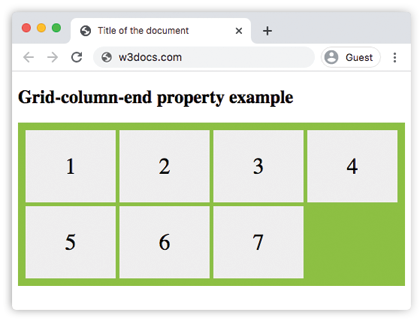
Пример свойства grid-column-end с номерами линий и значениями span:
Пример свойства CSS grid-column-end со значением span n
<!DOCTYPE html>
<html>
  <head>
    <title>Title of the document</title>
    <style>
      .grid-container {
        display: grid;
        grid-template-columns: auto auto auto auto;
        grid-gap: 10px;
        background-color: #ccc;
        padding: 10px;
      }
      .grid-container > div {
        background-color: #888;
        text-align: center;
        padding: 20px 0;
        font-size: 30px;
      }
      .box1 {
        grid-column-end: 3;
      }
      .span-container {
        display: grid;
        grid-template-columns: auto auto auto auto;
        grid-gap: 10px;
        background-color: #888;
        padding: 10px;
        margin-top: 20px;
      }
      .span-container > div {
        background-color: #ccc;
        text-align: center;
        padding: 20px 0;
        font-size: 30px;
      }
      .span-box1 {
        grid-column-end: span 3;
      }
    </style>
  </head>
  <body>
    <h2>Grid-column-end property example</h2>
    <div class="grid-container">
      <div class="box1">1</div>
      <div>2</div>
      <div>3</div>
      <div>4</div>
      <div>5</div>
      <div>6</div>
    </div>
    <div class="span-container">
      <div class="span-box1">1</div>
      <div>2</div>
      <div>3</div>
      <div>4</div>
      <div>5</div>
      <div>6</div>
    </div>
  </body>
</html>В верхней сетке используется grid-column-end: 3 (номер линии), поэтому первый элемент заканчивается на линии 3 и занимает два столбца. В нижней сетке используется grid-column-end: span 3, поэтому элемент охватывает три столбца, начиная со своей позиции.
В следующем примере мы снова используем span для управления количеством столбцов, которые занимает элемент.
Пример свойства grid-column-end со значением "span n":
Пример свойства CSS grid-column-end со значением 'span n'
<!DOCTYPE html>
<html>
  <head>
    <title>Title of the document</title>
    <style>
      article {
        display: grid;
        grid-template-columns: auto auto auto;
        grid-gap: 25px;
        padding: 20px;
        background-color: #7cbf7c;
      }
      article div {
        text-align: center;
        font-size: 35px;
        background-color: #ffffff;
        padding: 30px 0;
      }
      article div:first-child {
        grid-column-end: span 3;
      }
    </style>
  </head>
  <body>
    <article>
      <div>1</div>
      <div>2</div>
      <div>3</div>
      <div>4</div>
      <div>5</div>
    </article>
  </body>
</html>В следующем примере применённое значение указывает, на каком столбце должно заканчиваться отображение элемента.
Пример свойства grid-column-end с номером линии:
Пример свойства CSS grid-column-end со значением 'column-line':
<!DOCTYPE html>
<html>
  <head>
    <title>Title of the document</title>
    <style>
      .grid-container {
        display: grid;
        grid-gap: 5px;
        background-color: #8ebf42;
        grid-template-columns: auto auto auto;
        grid-gap: 20px;
        padding: 30px;
      }
      .grid-container > div {
        text-align: center;
        font-size: 35px;
        background-color: white;
        padding: 20px 0;
      }
      .box1 {
        grid-column-end: 3;
      }
    </style>
  </head>
  <body>
    <h2>Grid-column-end property example</h2>
    <div class="grid-container">
      <div class="box1">1</div>
      <div>2</div>
      <div>3</div>
      <div>4</div>
      <div>5</div>
      <div>6</div>
      <div>7</div>
      <div>8</div>
    </div>
  </body>
</html>Пример свойства grid-column-end со значением "auto":
Пример использования свойства CSS grid-column-end со значением auto.
<!DOCTYPE html>
<html>
  <head>
    <title>Title of the document</title>
    <style>
      .grid-container {
        display: grid;
        grid-template-columns: auto auto auto;
        grid-gap: 5px;
        background-color: #8ebf42;
        padding: 10px;
      }
      .grid-container > div {
        background-color: #eee;
        text-align: center;
        padding: 30px 0;
        font-size: 30px;
      }
      .box1 {
        grid-column-end: auto;
      }
    </style>
  </head>
  <body>
    <h2>Grid-column-end property example</h2>
    <div class="grid-container">
      <div class="box1">1</div>
      <div class="box2">2</div>
      <div class="box3">3</div>
      <div class="box4">4</div>
      <div class="box5">5</div>
      <div class="box6">6</div>
      <div class="box7">7</div>
    </div>
  </body>
</html>Значения
| Значение | Описание | Пример |
|---|---|---|
| auto | Автоматически размещает элемент; по умолчанию занимает один столбец. Это начальное значение. | Пример » |
| span n | Элемент заканчивается через n столбцов после начальной линии. | Пример » |
| column-line | Номер линии (положительный или отрицательный) или именованная линия, на которой должен заканчиваться элемент. | Пример » |
| initial | Устанавливает свойство в значение по умолчанию (auto). | |
| inherit | Наследует значение от родительского элемента. |
Типичные ошибки
span— относительное значение, линии — абсолютные.grid-column-end: 3всегда останавливается на линии 3;grid-column-end: span 3останавливается через три столбца после начальной линии. Путаница между ними — наиболее распространённая ошибка при работе с сеткой.- Конец раньше начала — это нормально, браузер поменяет их местами. Если
grid-column-endуказывает на линию раньшеgrid-column-start, два значения меняются местами, и область по-прежнему остаётся корректной. grid-column-endсам по себе не перемещает начало. Установка только конца оставляет начало на автоматическом размещении. Чтобы зафиксировать оба значения, используйте сокращённое свойствоgrid-column.
Связанные свойства
grid-column-start— начальный край строчной оси элемента.grid-column— сокращённое свойство для начала и конца вместе.grid-row-end— то же самое на оси блока (строки).grid-template-columns— определяет столбцы, между которыми проходят эти линии.