Свойство CSS column-count
Свойство CSS column-count задаёт количество колонок, на которые делится элемент. Значения и примеры.
Свойство column-count задаёт количество колонок, на которые разбивается содержимое элемента. Оно входит в модуль CSS многоколоночной раскладки, который позволяет единому блоку контента автоматически перетекать через несколько колонок — подобно газете или журналу — без необходимости вручную разбивать разметку.
На этой странице описано, что делает column-count, его синтаксис и допустимые значения, запускаемые примеры, взаимодействие с другими свойствами колонок, а также типичные подводные камни.
Что делает column-count
column-count принимает положительное целое число или ключевое слово auto. По умолчанию используется значение auto.
- При задании числового значения (например
3) браузер пытается разделить содержимое ровно на указанное количество колонок равной ширины. - При значении
autoколичество колонок определяется другими свойствами — прежде всегоcolumn-width. Если ниcolumn-count, ниcolumn-widthне заданы, содержимое отображается в одну колонку.
Если задать оба свойства — column-count и column-width, то column-count играет роль максимума: браузер размещает столько колонок шириной не менее column-width, сколько помещается, но не больше column-count. Такое сочетание является рекомендуемым адаптивным подходом; сокращённое свойство columns устанавливает оба значения сразу.
Когда это стоит использовать?
Многоколоночная раскладка хорошо подходит для длинных фрагментов непрерывного текста, читаемого последовательно — статей, страниц с условиями использования, списков ссылок, — где нужно, чтобы содержимое заполняло доступную ширину в сбалансированных колонках. Это не универсальная сетка: для двумерных макетов страниц используйте CSS Grid или Flexbox.
| Начальное значение | auto |
|---|---|
| Применяется к | Блочным контейнерам, кроме обёрток таблиц. |
| Наследуется | Нет. |
| Анимируется | Да. Количество колонок поддаётся анимации. |
| Версия | CSS3 |
| Синтаксис DOM | object.style.columnCount = "4"; |
Синтаксис
Синтаксис свойства column-count
column-count: <integer> | auto | initial | inherit;Пример свойства column-count:
Пример свойства CSS column-count со значением auto
<!DOCTYPE html>
<html>
  <head>
    <title>Title of the document</title>
    <style>
      div {
        column-count: auto;
      }
    </style>
  </head>
  <body>
    <h2>Column-count property example</h2>
    <div>
      Lorem Ipsum is dummy text of the printing and typesetting industry. Lorem Ipsum has been the industry's standard dummy text ever since the 1500s, when an unknown printer took a galley of type and scrambled it to make a type specimen book. It has survived not only five centuries, but also the leap into electronic typesetting, remaining essentially unchanged. It was popularised in the 1960s with the release of Letraset sheets containing Lorem Ipsum passages, and more recently with desktop publishing software like Aldus PageMaker including versions of Lorem Ipsum.
    </div>
  </body>
</html>Результат
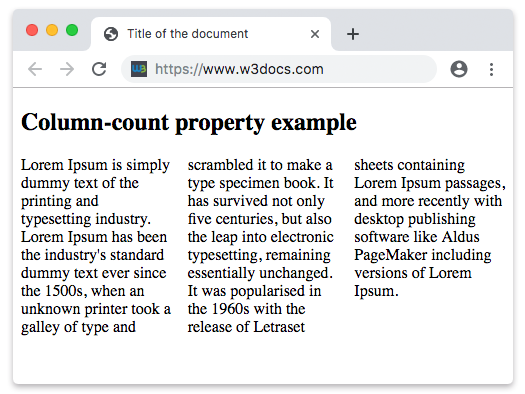
Пример свойства column-count с числовым значением:
Пример свойства CSS column-count с числовым значением
<!DOCTYPE html>
<html>
  <head>
    <title>Title of the document</title>
    <style>
      div {
        column-count: 7;
      }
    </style>
  </head>
  <body>
    <h2>Column-count property example</h2>
    <div>
      Lorem Ipsum is dummy text of the printing and typesetting industry. Lorem Ipsum has been the industry's standard dummy text ever since the 1500s when an unknown printer took a galley of type and scrambled it to make a type specimen book. It has survived not only five centuries, but also the leap into electronic typesetting, remaining essentially unchanged. It was popularised in the 1960s with the release of Letraset sheets containing Lorem Ipsum passages, and more recently with desktop publishing software like Aldus PageMaker including versions of Lorem Ipsum. It is a great fact that a reader will be distracted by the readable content of a page when looking at its layout.
    </div>
  </body>
</html>При column-count: 7 браузер разбивает тот же абзац на семь колонок. Если контейнер слишком узкий, чтобы дать каждой колонке пригодную ширину, колонки получатся очень тонкими — именно поэтому сочетание column-count с column-width (или сокращённое свойство columns) обычно предпочтительнее фиксированного числа.
Взаимодействие с другими свойствами колонок
column-count редко используется в одиночку. Следующие смежные свойства формируют результирующие колонки:
| Свойство | Что оно контролирует |
|---|---|
column-width | Идеальная ширина каждой колонки. В сочетании с column-count ограничивает количество колонок максимальным значением. |
column-gap | Промежуток между колонками. |
column-rule | Линия, проводимая между колонками (подобно border, но в промежутке). |
columns | Сокращение для одновременной установки column-width и column-count. |
column-span | Позволяет элементу (например, заголовку) растянуться на все колонки. |
column-fill | Определяет, распределяется ли содержимое равномерно по колонкам или заполняет их поочерёдно. |
Распространённый надёжный приём — задать целевую ширину и максимальное количество колонок одновременно:
.article {
  column-width: 14rem;   /* aim for ~14rem-wide columns */
  column-count: 3;       /* but never more than 3 */
  column-gap: 2rem;
}Подводные камни
- Только целые числа.
column-countне принимает дроби или единицы измерения —2.5и200pxнедопустимы. Используйтеcolumn-width, если хотите оперировать шириной. - Это максимум, а не гарантия. Если также задано
column-width, браузер может отрисовать меньше колонок, чем указано вcolumn-count, при недостатке пространства. - Содержимое может разрываться между колонками. Используйте свойство
break-inside(break-inside: avoid), чтобы предотвратить разрыв таких элементов, как изображения или пункты списка, на границе колонки. - Анимируется, но редко. Значение можно анимировать, однако перестройка текста при изменении числа колонок выглядит резко, поэтому в анимациях это практически не используется.
Свойство
column-countподдерживается всеми современными браузерами. Internet Explorer 10–11 и более старые версии Safari требовали префиксов-ms-/-webkit-; сегодня свойство без префикса безопасно использовать.
Значения
| Значение | Описание | Демонстрация |
|---|---|---|
| auto | Количество колонок определяется другими свойствами. Это значение по умолчанию. | Play it » |
<integer> | Задаёт точное количество колонок, по которым должно распределяться содержимое. | Play it » |
| initial | Устанавливает свойство в значение по умолчанию. | Play it » |
| inherit | Наследует свойство от родительского элемента. |