Свойство CSS column-rule-width
Свойство CSS column-rule-width задаёт толщину разделителя между колонками многоколоночного макета. Примеры использования.
Свойство CSS column-rule-width задаёт толщину разделителя (разделительной линии), которая отрисовывается между колонками многоколоночного макета. Оно работает аналогично ширине рамки — но вместо того чтобы окружать блок, разделитель располагается в промежутке между колонками. Это одно из свойств CSS3.
Само по себе column-rule-width не даёт видимого результата. Разделитель появляется только тогда, когда column-rule-style установлено в значение, отличное от none (начального значения), поскольку линия без стиля ничего не отрисовывает. Также необходимо наличие более одной колонки — разделитель рисуется только в промежутках, которые фактически разделяют колонки, и никогда в пустом пространстве, оставшемся из-за того, что контент не заполнил все колонки.
Свойство принимает одно из следующих значений:
thin— тонкий разделитель.medium— средний разделитель. Это начальное значение.thick— толстый разделитель.<length>— явная ширина, например2pxили0.2em. Проценты и отрицательные значения не допускаются.
Спецификация намеренно оставляет точную толщину в пикселях для thin, medium и thick на усмотрение браузера. Гарантируется лишь порядок: thin ≤ medium ≤ thick. Если вам нужен предсказуемый результат во всех браузерах, используйте <length>.
В большинстве таблиц стилей ширина, стиль и цвет задаются совместно через сокращённое свойство column-rule, а не тремя отдельными объявлениями:
/* These two rules are equivalent */
column-rule: 15px groove #1c87c9;

column-rule-width: 15px;
column-rule-style: groove;
column-rule-color: #1c87c9;| Начальное значение | medium |
|---|---|
| Применяется к | Многоколоночным элементам. |
| Наследуется | Нет. |
| Анимируется | Да. Ширина и цвет разделителя могут анимироваться. |
| Версия | CSS3 |
| DOM Syntax | object.style.columnRuleWidth = "5px"; |
Синтаксис
Синтаксис свойства CSS column-rule-width
column-rule-width: medium | thin | thick | length | initial | inherit;Пример свойства column-rule-width:
Пример свойства CSS column-rule-width со значением thick
<!DOCTYPE html>
<html>
  <head>
    <title>Title of the document</title>
    <style>
      div {
        column-count: 3;
        column-gap: 40px;
        column-rule-style: dotted;
        column-rule-color: #666;
        column-rule-width: thick;
        text-align: justify;
      }
    </style>
  </head>
  <body>
    <h1>Column-rule-width property example</h1>
    <div>
      Lorem Ipsum is dummy text of the printing and typesetting industry. Lorem Ipsum has been the industry's standard dummy text ever since the 1500s, when an unknown printer took a galley of type and scrambled it to make a type specimen book. It has survived not only five centuries, but also the leap into electronic typesetting, remaining essentially unchanged. It was popularised in the 1960s with the release of Letraset sheets containing Lorem Ipsum passages, and more recently with desktop publishing software like Aldus PageMaker including versions of Lorem Ipsum.
    </div>
  </body>
</html>Результат
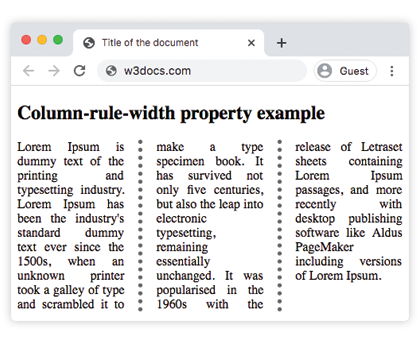
Пример свойства column-rule-width со значением "thin":
Пример свойства CSS column-rule-width со значением thin
<!DOCTYPE html>
<html>
  <head>
    <title>Title of the document</title>
    <style>
      div {
        column-count: 3;
        column-gap: 40px;
        column-rule-style: solid;
        column-rule-width: thin;
        text-align: justify;
      }
    </style>
  </head>
  <body>
    <h1>Column-rule-width property example</h1>
    <div>
      Lorem Ipsum is dummy text of the printing and typesetting industry. Lorem Ipsum has been the industry's standard dummy text ever since the 1500s, when an unknown printer took a galley of type and scrambled it to make a type specimen book. It has survived not only five centuries, but also the leap into electronic typesetting, remaining essentially unchanged. It was popularised in the 1960s with the release of Letraset sheets containing Lorem Ipsum passages, and more recently with desktop publishing software like Aldus PageMaker including versions of Lorem Ipsum.
    </div>
  </body>
</html>Пример свойства column-rule-width со значением "15px":
Пример свойства CSS column-rule-width со значением length
<!DOCTYPE html>
<html>
  <head>
    <title>Title of the document</title>
    <style>
      div {
        column-count: 3;
        column-gap: 40px;
        column-rule-style: groove;
        column-rule-color: #1c87c9;
        column-rule-width: 15px;
        text-align: justify;
      }
    </style>
  </head>
  <body>
    <h1>Column-rule-width property example</h1>
    <div>
      Lorem Ipsum is dummy text of the printing and typesetting industry. Lorem Ipsum has been the industry's standard dummy text ever since the 1500s when an unknown printer took a galley of type and scrambled it to make a type specimen book. It has survived not only five centuries, but also the leap into electronic typesetting, remaining essentially unchanged. It was popularised in the 1960s with the release of Letraset sheets containing Lorem Ipsum passages, and more recently with desktop publishing software like Aldus PageMaker including versions of Lorem Ipsum.
    </div>
  </body>
</html>Значения
| Значение | Описание | Попробовать |
|---|---|---|
| medium | Разделитель средней толщины. Это значение по умолчанию. | |
| thick | Толстый разделитель. | |
| thin | Тонкий разделитель. | |
| length | Задаёт ширину разделителя. | |
| initial | Устанавливает свойство в значение по умолчанию. | |
| inherit | Наследует свойство от родительского элемента. |
Важно помнить
- Разделитель не занимает пространство в макете. Как и
box-shadow, разделитель отрисовывается внутриcolumn-gap. Разделитель, ширина которого превышает ширину промежутка, перекроет содержимое колонок, а не раздвинет их, поэтому убедитесь, что промежуток достаточно широк для выбранного значения. - Без стиля нет разделителя. Если
column-rule-styleравенnone(или не задан), изменение ширины не даст никакого видимого эффекта. Это наиболее распространённая причина, по которой разделитель «не отображается». - Только длины — никаких процентов. В отличие от многих других CSS-размеров,
column-rule-widthне принимает процентные и отрицательные значения; недопустимое значение приводит к игнорированию всего объявления. - Свойство анимируется. Переход по ширине создаёт плавное утолщение или утоньшение разделителя.
Связанные свойства
Разделитель многоколоночного макета управляется небольшой группой свойств, которые обычно используются совместно:
column-rule— сокращённое свойство для ширины, стиля и цвета.column-rule-style— стиль линии; обязателен для отображения ширины.column-rule-color— цвет разделителя.column-countиcolumn-gap— определяют количество колонок и пространство, в котором располагается разделитель.