CSS-свойство overflow
CSS-свойство overflow задаёт поведение содержимого, выходящего за пределы блока. Значения свойства и примеры.
CSS-свойство overflow управляет тем, что происходит, когда содержимое элемента не вмещается в его блок. Вы сами решаете: обрезать лишнее содержимое, показать его как есть или сделать прокручиваемым.
Переполнение становится заметным только тогда, когда у блока есть ограниченный размер. Самый распространённый способ ограничить размер — задать фиксированную высоту (и, при необходимости, ширину), но блок также может быть ограничен макетом flex или grid. Если блок может свободно расти под содержимое, переполнения нет и свойство не оказывает видимого эффекта.
overflow — это сокращённое свойство, которое одновременно задаёт два полных свойства:
- overflow-x — управляет обрезкой по горизонтальной оси (слева/справа).
- overflow-y — управляет обрезкой по вертикальной оси (сверху/снизу).
Если вы задаёте overflow с одним значением, оба направления получают это значение. При двух значениях первое применяется к overflow-x, второе — к overflow-y (например, overflow: hidden scroll;).
Обзор значений
Свойство overflow принимает следующие ключевые слова:
visible— значение по умолчанию. Содержимое не обрезается; оно выходит за пределы блока и перекрывает соседние элементы.hidden— содержимое, которое не вмещается, обрезается и становится невидимым. Полоса прокрутки не показывается, поэтому скрытая часть недоступна пользователю.scroll— содержимое обрезается, а полосы прокрутки отображаются всегда (даже если всё помещается), что предотвращает смещение макета.auto— содержимое обрезается, а полосы прокрутки появляются только при необходимости. Это обычный выбор для прокручиваемых панелей.overlay— какauto, но полосы прокрутки рисуются поверх содержимого, не занимая пространства.
Значение overlay устарело и не должно использоваться. Вместо него используйте auto — современные браузеры умеют рисовать полосы прокрутки поверх содержимого в зависимости от настроек ОС пользователя.
Как выбрать значение
- Используйте
autoдля прокручиваемых областей (панели чата, блоки кода, модальные окна) — полосы прокрутки появятся только если содержимое действительно переполняет блок. - Используйте
hiddenдля намеренного обрезания содержимого, обрезки изображения с закруглёнными углами или для удержания плавающих элементов (см. ниже). Помните: скрытое содержимое пользователь не увидит, поэтому не скрывайте то, к чему должен быть доступ. - Используйте
scroll, если хотите зарезервировать место для полосы прокрутки, чтобы макет не прыгал при изменении содержимого. - Оставьте
visible, когда переполнение допустимо — например, для всплывающей подсказки или выпадающего меню, которое намеренно выходит за пределы родителя.
Два полезных побочных эффекта
Удержание плавающих элементов. Установка overflow в любое значение, кроме visible, заставляет элемент вырасти достаточно, чтобы вместить своих плавающих потомков. Таким образом, родительский элемент с overflow: hidden (или auto) и без заданной высоты растянется, включив в себя плавающее содержимое. Обратите внимание: это не очищает float — лишь удерживает его. (Современная альтернатива — display: flow-root, которая делает то же самое без побочного эффекта обрезки.)
Создание блочного контекста форматирования (BFC). Значение overflow, отличное от visible, создаёт новый блочный контекст форматирования. Это удобно, когда нужно, чтобы блочный элемент аккуратно располагался рядом с плавающим элементом, а не уходил под него.
| Начальное значение | visible |
|---|---|
| Применяется к | Блочным контейнерам, контейнерам flex и grid. |
| Наследуется | Нет. |
| Анимируется | Нет. |
| Версия | CSS2 |
| DOM Syntax | Object.style.overflow = "auto"; |
Синтаксис
Синтаксис CSS overflow
overflow: visible | hidden | scroll | auto | overlay | initial | inherit;Пример свойства overflow со значением "visible"
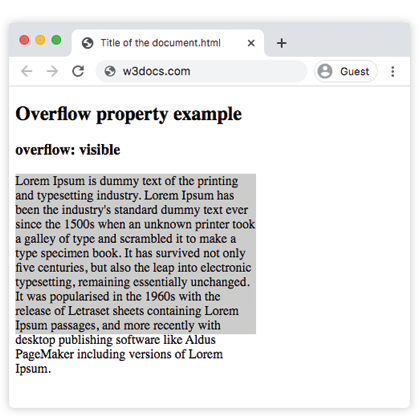
При значении visible текст абзаца выходит за нижнюю границу блока высотой 200px вместо того, чтобы быть обрезанным — поведение по умолчанию.
Пример кода CSS overflow
<!DOCTYPE html>
<html>
  <head>
    <style>
      p {
        background-color: #ccc;
        width: 300px;
        height: 200px;
        overflow: visible;
      }
    </style>
  </head>
  <body>
    <h2>Overflow property example</h2>
    <h3>overflow: visible</h3>
    <p>Lorem Ipsum is dummy text of the printing and typesetting industry. Lorem Ipsum has been the industry's standard dummy text ever since the 1500s when an unknown printer took a galley of type and scrambled it to make a type specimen book. It has survived not only five centuries, but also the leap into electronic typesetting, remaining essentially unchanged. It was popularised in the 1960s with the release of Letraset sheets containing Lorem Ipsum passages, and more recently with desktop publishing software like Aldus PageMaker including versions of Lorem Ipsum.</p>
  </body>
</html>Результат
Пример свойства overflow со значением "scroll"
При значении scroll обе полосы прокрутки отображаются независимо от того, нужны они или нет, а выходящий за пределы текст становится доступным при прокрутке.
Пример CSS overflow scroll
<!DOCTYPE html>
<html>
  <head>
    <style>
      p {
        background-color: #ccc;
        width: 300px;
        height: 200px;
        overflow: scroll;
      }
    </style>
  </head>
  <body>
    <h2>Overflow property example</h2>
    <h3>overflow: scroll</h3>
    <p>Lorem Ipsum is simply dummy text of the printing and typesetting industry. Lorem Ipsum has been the industry's standard dummy text ever since the 1500s when an unknown printer took a galley of type and scrambled it to make a type specimen book. It has survived not only five centuries, but also the leap into electronic typesetting, remaining essentially unchanged. It was popularised in the 1960s with the release of Letraset sheets containing Lorem Ipsum passages, and more recently with desktop publishing software like Aldus PageMaker including versions of Lorem Ipsum.</p>
  </body>
</html>Пример свойства overflow со значением "hidden"
При значении hidden текст, который не вмещается, обрезается, а полоса прокрутки не отображается — обрезанная часть недостижима.
Пример CSS overflow hidden
<!DOCTYPE html>
<html>
  <head>
    <style>
      p {
        background-color: #ccc;
        width: 300px;
        height: 200px;
        overflow: hidden;
      }
    </style>
  </head>
  <body>
    <h2>Overflow property example</h2>
    <h3>overflow: hidden</h3>
    <p>Lorem Ipsum is dummy text of the printing and typesetting industry. Lorem Ipsum has been the industry's standard dummy text ever since the 1500s when an unknown printer took a galley of type and scrambled it to make a type specimen book. It has survived not only five centuries, but also the leap into electronic typesetting, remaining essentially unchanged. It was popularised in the 1960s with the release of Letraset sheets containing Lorem Ipsum passages, and more recently with desktop publishing software like Aldus PageMaker including versions of Lorem Ipsum.</p>
  </body>
</html>Пример свойства overflow со значением "auto"
auto — наиболее практичное значение: полоса прокрутки появляется только на той оси, по которой действительно происходит переполнение. Этот пример также показывает, как можно независимо задавать overflow-x и overflow-y.
CSS overflow auto
<!DOCTYPE html>
<html>
  <head>
    <title>Title of the document</title>
    <style>
      .scroll {
        width: 200px;
        height: 300px;
        border: 1px solid;
        overflow: auto;
        margin-bottom: 10px;
      }
      .scroll-x {
        width: 200px;
        height: 300px;
        border: 1px solid;
        overflow-x: auto;
        overflow-y: hidden;
        margin-bottom: 10px;
      }
      .scroll-y {
        width: 200px;
        height: 300px;
        border: 1px solid;
        overflow-y: auto;
        margin-bottom: 10px;
      }
      .scroll>div {
        width: 400px;
        height: 50px;
        background: #ccc;
      }
      .scroll-y>div {
        width: 200px;
        height: 50px;
        background: #ccc;
      }
      .scroll-x>div {
        width: 400px;
        height: 50px;
        background: #ccc;
        overflow: hidden;
      }
    </style>
  </head>
  <body>
    <h1>Example with Overflow Property</h1>
    <h2>overflow overflow scroll auto</h2>
    <div class="scroll">
      <h2>Overflow Property </h2>
      <div>
        <h2>overflow scroll property</h2>
      </div>
      <p>
        Lorem Ipsum is dummy text of the printing and typesetting industry. Lorem Ipsum has been the industry's standard dummy text ever since the 1500s when an unknown printer took a galley of type and scrambled it to make a type specimen book. It has survived not only five centuries, but also the leap into electronic typesetting, remaining essentially unchanged. It was popularised in the 1960s with the release of Letraset sheets containing Lorem Ipsum passages, and more recently with desktop publishing software like Aldus PageMaker including versions of Lorem Ipsum.
      </p>
    </div>
    <h2>overflow overflow-x auto</h2>
    <div class="scroll-x">
      <h2>Overflow Property </h2>
      <div>
        <h2>overflow scroll-x property</h2>
      </div>
      <p>
        Lorem Ipsum is dummy text of the printing and typesetting industry. Lorem Ipsum has been the industry's standard dummy text ever since the 1500s when an unknown printer.
      </p>
    </div>
    <h2>overflow overflow-y auto</h2>
    <div class="scroll-y">
      <h2>Overflow Property </h2>
      <div>
        <h2>overflow scroll-y property</h2>
      </div>
      <p>
        Lorem Ipsum is dummy text of the printing and typesetting industry. Lorem Ipsum has been the industry's standard dummy text ever since the 1500s when an unknown printer took a galley of type and scrambled it to make a type specimen book. software like Aldus PageMaker including versions of Lorem Ipsum.but also the leap into electronic typesetting, remaining essentially unchanged. It was popularised in the 1960s with the release of Letraset sheets containing Lorem Ipsum passages, and more recently with desktop publishing software like Aldus PageMaker including versions of Lorem Ipsum.
      </p>
    </div>
  </body>
</html>Пример свойства overflow со всеми значениями
В этом примере один и тот же текст помещается в пять блоков, чтобы можно было сравнить каждое значение рядом.
Пример CSS overflow со всеми значениями
<!DOCTYPE html>
<html>
  <head>
    <title>Title of the document</title>
    <style>
      div.scroll {
        background-color: #eee;
        width: 300px;
        height: 200px;
        overflow: scroll;
      }
      div.hidden {
        background-color: #eee;
        width: 300px;
        height: 200px;
        overflow: hidden;
      }
      div.auto {
        background-color: #eee;
        width: 300px;
        height: 200px;
        overflow: auto;
      }
      div.visible {
        background-color: #eee;
        width: 300px;
        height: 200px;
        overflow: visible;
      }
      div.overlay {
        background-color: #eee;
        width: 300px;
        height: 200px;
        overflow: overlay;
      }
    </style>
  </head>
  <body>
    <h2>Overflow property example</h2>
    <h3>overflow: scroll</h3>
    <div class="scroll">
      Lorem Ipsum is dummy text of the printing and typesetting industry. Lorem Ipsum has been the industry's standard dummy text ever since the 1 500s when an unknown printer took a galley of type and scrambled it to make a type specimen book. It has survived not only five centuries, but also the leap into electronic typesetting, remaining essentially unchanged. It was popularised in the 1960s with the release of Letraset sheets containing Lorem Ipsum passages, and more recently with desktop publishing software like Aldus PageMaker including versions of Lorem Ipsum.
    </div>
    <h3>overflow: hidden</h3>
    <div class="hidden">
      Lorem Ipsum is the dummying text of the printing and typesetting industry. Lorem Ipsum has been the industry's standard dummy text ever since the 1500s when an unknown printer took a galley of type and scrambled it to make a type specimen book. It has survived not only five centuries, but also the leap into electronic typesetting, remaining essentially unchanged. It was popularised in the 1960s with the release of Letraset sheets containing Lorem Ipsum passages, and more recently with desktop publishing software like Aldus PageMaker including versions of Lorem Ipsum.
    </div>
    <h3>overflow: auto</h3>
    <div class="auto">
      Lorem Ipsum is the dummying text of the printing and typesetting industry. Lorem Ipsum has been the industry's standard dummy text ever since the 1500s when an unknown printer took a galley of type and scrambled it to make a type specimen book. It has survived not only five centuries, but also the leap into electronic typesetting, remaining essentially unchanged. It was popularised in the 1960s with the release of Letraset sheets containing Lorem Ipsum passages, and more recently with desktop publishing software like Aldus PageMaker including versions of Lorem Ipsum.
    </div>
    <h3>overflow: visible</h3>
    <div class="visible">
      Lorem Ipsum is the dummying text of the printing and typesetting industry. Lorem Ipsum has been the industry's standard dummy text ever since the 1500s when an unknown printer took a galley of type and scrambled it to make a type specimen book. It has survived not only five centuries, but also the leap into electronic typesetting, remaining essentially unchanged. It was popularised in the 1960s with the release of Letraset sheets containing Lorem Ipsum passages, and more recently with desktop publishing software like Aldus PageMaker including versions of Lorem Ipsum.
    </div>
    <br />
    <br />
    <h3>overflow: overlay</h3>
    <div class="overlay">
      Lorem Ipsum is the dummying text of the printing and typesetting industry. Lorem Ipsum has been the industry's standard dummy text ever since the 1500s when an unknown printer took a galley of type and scrambled it to make a type specimen book. It has survived not only five centuries, but also the leap into electronic typesetting, remaining essentially unchanged. It was popularised in the 1960s with the release of Letraset sheets containing Lorem Ipsum passages, and more recently with desktop publishing software like Aldus PageMaker including versions of Lorem Ipsum.
    </div>
  </body>
</html>Значения
| Значение | Описание | Попробуйте |
|---|---|---|
| visible | Содержимое не обрезается и отображается за пределами блока отступов. Это значение по умолчанию. | Попробуйте » |
| hidden | Содержимое обрезается по размеру блока отступов. | Попробуйте » |
| scroll | Добавляется полоса прокрутки для просмотра остального содержимого. | Попробуйте » |
| auto | Зависит от браузера. Если содержимое переполняет блок, добавляется полоса прокрутки. | Попробуйте » |
| overlay | Работает так же, как auto, но полосы прокрутки рисуются поверх содержимого, не занимая пространства. Это устаревшее значение не следует использовать, хотя оно может ещё работать. | Попробуйте » |
| initial | Устанавливает свойству значение по умолчанию. | Попробуйте » |
| inherit | Наследует свойство от родительского элемента. |
Связанные свойства
- overflow-x и overflow-y — задают обрезку по каждой оси отдельно.
- white-space — используйте
nowrapвместе сoverflow: hidden, чтобы удержать текст в одну строку перед обрезкой. - display —
display: flow-rootудерживает плавающие элементы без побочных эффектов обрезки, свойственныхoverflow.