Свойство CSS justify-content
Узнайте о свойстве justify-content, которое определяет расположение элементов контейнера. Значения и примеры.
Свойство justify-content распределяет оставшееся пространство вдоль главной оси flex- (или grid-) контейнера, управляя тем, как его элементы расставляются и выравниваются, когда они не заполняют всю строку целиком. Это подсвойство модуля Flexible Box Layout и одно из свойств CSS3.
На этой странице объясняется, что такое главная ось, разбирается каждое значение с интерактивным примером, а также перечисляются типичные ошибки при использовании этого свойства.
Почему важна главная ось
justify-content действует только вдоль главной оси — направления, в котором выстраиваются flex-элементы. Это направление задаётся свойством flex-direction:
flex-direction: row(значение по умолчанию) → главная ось идёт слева направо, поэтомуjustify-contentперемещает элементы по горизонтали.flex-direction: column→ главная ось идёт сверху вниз, поэтому то же значениеjustify-contentтеперь перемещает элементы по вертикали.
Для выравнивания элементов по поперечной оси (перпендикулярному направлению) используйте align-items, а для распределения пространства между перенесёнными строками flex — align-content. Распространённая ошибка новичков — пытаться с помощью justify-content центрировать что-либо по вертикали в контейнере с направлением row; за это отвечает align-items.
justify-content вступает в силу только тогда, когда контейнер является flex- или grid-контейнером, то есть свойство display установлено в flex или grid. На обычном блочном контейнере оно не оказывает никакого эффекта.
| Начальное значение | flex-start |
|---|---|
| Применяется к | Flex-контейнерам. |
| Наследуется | Нет. |
| Анимируется | Нет. |
| Версия | CSS3 |
| DOM-синтаксис | object.style.justifyContent = "center"; |
Синтаксис
Синтаксис CSS justify-content
justify-content: flex-start | flex-end | center | space-between | space-around | space-evenly | initial | inherit;Пример свойства justify-content:
Пример кода CSS justify-content
<!DOCTYPE html>
<html>
  <head>
    <title>Title of the document </title>
    <style>
      .center {
        width: 400px;
        height: 150px;
        border: 1px solid #666;
        display: flex;
        justify-content: center;
      }
      .center div {
        width: 70px;
        height: 70px;
        background-color: #ccc;
        border: 1px solid #666;
      }
    </style>
  </head>
  <body>
    <h2>Justify-content property example</h2>
    <p>Here the "justify-content: center" is set:</p>
    <div class="center">
      <div>1</div>
      <div>2</div>
      <div>3</div>
    </div>
  </body>
</html>Результат
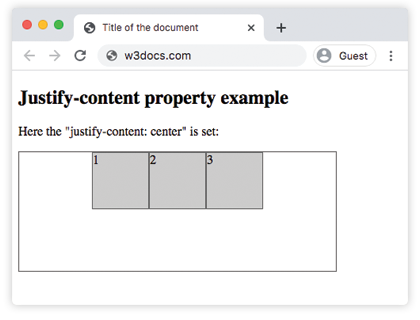
Пример свойства justify-content со значением "flex-start":
Пример CSS justify-content flex-start
<!DOCTYPE html>
<html>
  <head>
    <title>Title of the document </title>
    <style>
      .start {
        width: 400px;
        height: 150px;
        border: 1px solid #666;
        display: flex;
        justify-content: flex-start;
      }
      .start div {
        width: 70px;
        height: 70px;
        background-color: #ccc;
        border: 1px solid #666;
      }
    </style>
  </head>
  <body>
    <h2>Justify-content property example</h2>
    <p>Here the "justify-content: flex-start" is set:</p>
    <div class="start">
      <div>1</div>
      <div>2</div>
      <div>3</div>
    </div>
  </body>
</html>Пример свойства justify-content со значением "flex-end":
Пример CSS justify-content flex-end
<!DOCTYPE html>
<html>
  <head>
    <title>Title of the document </title>
    <style>
      .end {
        width: 400px;
        height: 150px;
        border: 1px solid #666;
        display: flex;
        justify-content: flex-end;
      }
      .end div {
        width: 70px;
        height: 70px;
        background-color: #ccc;
        border: 1px solid #666;
      }
    </style>
  </head>
  <body>
    <h2>Justify-content property example</h2>
    <p>Here the "justify-content: flex-end" is set:</p>
    <div class="end">
      <div>1</div>
      <div>2</div>
      <div>3</div>
    </div>
  </body>
</html>Пример свойства justify-content со значением "space-between":
Пример CSS justify-content space-between
<!DOCTYPE html>
<html>
  <head>
    <title>Title of the document </title>
    <style>
      .space-between {
        width: 400px;
        height: 150px;
        border: 1px solid #666;
        display: flex;
        justify-content: space-between;
      }

      .space-between div {
        width: 70px;
        height: 70px;
        background-color: #ccc;
        border: 1px solid #666;
      }
    </style>
  </head>
  <body>
    <h2>Justify-content property example</h2>
    <p>Here the "justify-content: space-between" is set:</p>
    <div class="space-between">
      <div>1</div>
      <div>2</div>
      <div>3</div>
    </div>
  </body>
</html>Пример свойства justify-content со значением "space-around":
Пример CSS justify-content space-around
<!DOCTYPE html>
<html>
  <head>
    <title>Title of the document </title>
    <style>
      .space-around {
        width: 400px;
        height: 150px;
        border: 1px solid #666;
        display: flex;
        justify-content: space-around;
      }
      .space-around div {
        width: 70px;
        height: 70px;
        background-color: #ccc;
        border: 1px solid #666;
      }
    </style>
  </head>
  <body>
    <h2>Justify-content property example</h2>
    <p>Here the "justify-content: space-around" is used:</p>
    <div class="space-around">
      <div>1</div>
      <div>2</div>
      <div>3</div>
    </div>
  </body>
</html>Пример свойства justify-content со значением "space-evenly":
При использовании space-evenly отступы перед первым элементом, между всеми элементами и после последнего элемента одинаковы. (При space-around внешние отступы составляют лишь половину от отступов между элементами, а space-between вовсе не оставляет внешних отступов.)
<!DOCTYPE html>
<html>
  <head>
    <title>Title of the document </title>
    <style>
      .space-evenly {
        width: 400px;
        height: 150px;
        border: 1px solid #666;
        display: flex;
        justify-content: space-evenly;
      }
      .space-evenly div {
        width: 70px;
        height: 70px;
        background-color: #ccc;
        border: 1px solid #666;
      }
    </style>
  </head>
  <body>
    <h2>Justify-content property example</h2>
    <p>Here the "justify-content: space-evenly" is used:</p>
    <div class="space-evenly">
      <div>1</div>
      <div>2</div>
      <div>3</div>
    </div>
  </body>
</html>На что обратить внимание
justify-contentне даёт никакого эффекта, если родительский элемент не является flex- или grid-контейнером (display: flex/display: grid).- Три «пространственных» ключевых слова отличаются только внешними отступами: у
space-betweenих нет,space-aroundдаёт внешние отступы в половину размера, аspace-evenlyделает все отступы равными. - Ось, вдоль которой действует свойство, определяется flex-direction. Смените направление на
column— и то же значение будет работать сверху вниз. - Свойство имеет смысл только при наличии свободного пространства. Если элементы уже заполнили (или переполнили) главную ось, распределять нечего.
Значения
| Значение | Описание | Попробовать |
|---|---|---|
| flex-start | Элементы размещаются от начала контейнера. | Попробовать » |
| flex-end | Элементы размещаются в конце контейнера. | Попробовать » |
| center | Элементы размещаются по центру контейнера. | Попробовать » |
| space-around | Между элементами и вокруг них распределяется пространство. | Попробовать » |
| space-between | Пространство распределяется между элементами. | Попробовать » |
| space-evenly | Равное пространство распределяется до, между и после элементов. | Попробовать » |
| initial | Устанавливает для свойства значение по умолчанию. | Попробовать » |
| inherit | Наследует свойство от родительского элемента. |
Практика
Связанные свойства
- align-items — выравнивает элементы вдоль поперечной оси.
- align-content — распределяет перенесённые строки flex вдоль поперечной оси.
- flex-direction — задаёт, какая ось является главной.
- The Ultimate Guide to Flexbox — полная модель Flexbox в одном месте.