HTML тег <section>
Тег <section> группирует тематический контент страницы. Узнайте, когда использовать section, article или div, правило заголовка и ориентир region.
HTML-элемент <section> — один из семантических элементов HTML5. Он объединяет связанный контент, образующий тематическую часть страницы — часть, которая в идеале должна отображаться как пункт в структуре документа (блок новостей, раздел «Контакты», глава длинной статьи и т. д.).
На этой странице объясняется, что означает <section>, как выбирать между <section>, <article> и <div>, почему секция почти всегда требует заголовка и какое правило доступности превращает секцию в навигационный ориентир.
Когда использовать <section>, <article> или <div>
Эти три элемента выглядят взаимозаменяемыми, но несут совершенно разный смысл. Выбирайте по назначению, а не по внешнему виду:
<section>— тематическая группировка контента, которая принадлежит структуре страницы и имеет собственный заголовок. Используйте его, когда контент является «самостоятельной частью этой страницы», но теряет смысл без страницы. Примеры: блок Введение, блок Цены, блок Отзывы на странице товара.<article>— самодостаточная, независимо распространяемая композиция. Используйте его, когда контент сохраняет смысл, если его извлечь и опубликовать отдельно (синдицированная лента, запись RSS, результат поиска). Примеры: публикация в блоге, новостная статья, отдельный комментарий пользователя, карточка товара.<div>— никакого семантического значения; универсальный блок, который существует только как крючок для стилей или скриптов. Используйте<div>, когда нужна просто обёртка для вёрстки (контейнер flex/grid, колонка) и нет тематического контента для обозначения.
Быстрый тест: если блоку можно дать осмысленный заголовок, скорее всего это <section>. Если блок может существовать самостоятельно как отдельная страница или элемент ленты — это <article>. Если элемент добавляется только для присвоения CSS или класса — это <div>.
Не используйте <section> как универсальную обёртку для вёрстки или стилизации. Если блок разметки не несёт тематического смысла и не имеет заголовка, используйте вместо него <div>.
Требование к заголовку
HTML ожидает, что каждый <section> будет идентифицирован, и стандартный способ это сделать — добавить заголовок (<h1>–<h6>). Секция без заголовка не имеет чёткой темы и создаёт запутанную «безымянную» запись в структурах документов вспомогательных технологий.
Используйте уровень заголовка, соответствующий глубине вложенности: <h2> для секции верхнего уровня под <h1> страницы, <h3> для секции на один уровень глубже и так далее. Сохраняйте логическую иерархию без пропуска уровней — см. Заголовки HTML для ознакомления с правилами.
<h1>Web technologies</h1>

<section>
  <h2>HTML</h2>
  <p>HTML is the standard markup language for creating web pages.</p>
</section>

<section>
  <h2>CSS</h2>
  <p>CSS describes how HTML elements should be presented.</p>
</section><section> и доступность: ориентир region
<section> не является автоматически ориентиром, к которому пользователи программ чтения с экрана могут переходить напрямую. Он становится навигационным ориентиром region только при наличии доступного имени. Задать его можно двумя способами:
aria-labelledbyсо ссылкой наidзаголовка (предпочтительный вариант — видимый заголовок и доступное имя остаются синхронизированными), илиaria-labelс буквальной строкой (когда нет видимого текста заголовка для ссылки).
Без имени секция является просто группировкой для структуры документа; с именем она появляется в списке ориентиров программы чтения с экрана.
<section aria-labelledby="pricing-heading">
  <h2 id="pricing-heading">Pricing</h2>
  <p>Choose the plan that fits your team.</p>
</section>

<!-- No visible heading? Name it directly: -->
<section aria-label="Search results">
  <p>3 results found.</p>
</section>Именно поэтому <section> отличается от таких элементов, как <main>, <aside>, <header> и <footer>: они раскрывают роли ориентиров самостоятельно, тогда как <section> требует имени для этого.
Синтаксис
Тег <section> используется парно. Контент записывается между открывающим (<section>) и закрывающим (</section>) тегами.
Пример HTML-тега <section>:
<!DOCTYPE html>
<html>
  <head>
    <title>Using the section tag</title>
  </head>
  <body>
    <section>
      <h2>Hypertext markup language HTML</h2>
      <p>HTML is the standard markup language for creating web pages and web applications. Browsers receive HTML documents from a web server or from local storage and render the documents into multimedia web pages. HTML describes the structure of a web page semantically and originally included cues for the appearance of the document.</p>
    </section>
    <section>
      <h2>CSS</h2>
      <p>Formal language, which is used as a description zone, formatting the appearance of a web page, written by the help of markup languages HTML and XHTML, but it can be applied to any XML-document, for example, to SVG or XUL.</p>
    </section>
  </body>
</html>Результат
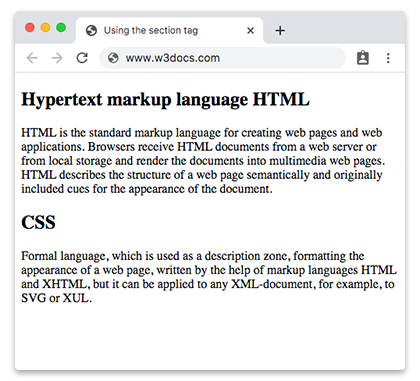
Пример <section> внутри <article>:
Длинный самодостаточный материал оформляется как <article>, а главы внутри него — как элементы <section>. Каждая секция имеет собственный заголовок и собственный отдельный контент.
<!DOCTYPE html>
<html>
  <head>
    <title>Title of the document</title>
  </head>
  <body>
    <article>
      <h1>A short guide to web technologies</h1>
      <p>Modern web pages are built from three core technologies that work together.</p>

      <section>
        <h2>HTML: structure</h2>
        <p>HTML is the standard markup language for web pages. It describes the structure of a document — headings, paragraphs, links and media — so browsers can render it as a page.</p>
      </section>

      <section>
        <h2>CSS: presentation</h2>
        <p>CSS controls how the structured content looks: colors, spacing, typography and responsive layout across different screen sizes.</p>
      </section>

      <section>
        <h2>JavaScript: behavior</h2>
        <p>JavaScript adds interactivity, letting the page respond to user actions, update content dynamically and communicate with servers.</p>
      </section>
    </article>
  </body>
</html>Атрибуты
Тег <section> поддерживает глобальные атрибуты и атрибуты событий.
Как стилизовать HTML-тег <section>
section {
  background-color: #f9f9f9;
  padding: 20px;
  border: 1px solid #ddd;
}