Тег HTML <hr>
Тег HTML <hr> — это блочный элемент, который представляет тематический разрыв в HTML-документе. Внешний вид горизонтальной линии зависит от браузера. Часто она отображается с border, создающим 3D-эффект.
В HTML5 тег <hr> определяет тематический разрыв между элементами уровня абзаца. В предыдущих версиях HTML он использовался для создания горизонтальной линии, визуально разделяющей содержимое. В HTML5 он несет семантическое значение.
Синтаксис
Тег <hr> пустой, то есть закрывающий тег не требуется. Но в XHTML тег (<hr>) должен быть закрыт (<hr/>).
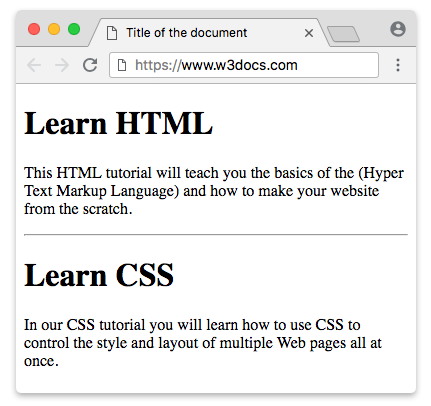
Пример тега HTML <hr>:
HTML hr tag
<!DOCTYPE html>
<html>
  <head>
    <title>Title of the document</title>
  </head>
  <body>
    <h1>Learn HTML</h1>
    <p>
      This HTML tutorial will teach you the basics of the (Hyper Text Markup Language) and how to make your website from scratch.
    </p>
    <hr />
    <h1>Learn CSS</h1>
    <p>
      In our CSS tutorial you will learn how to use CSS to control the style and layout of multiple Web pages all at once.
    </p>
  </body>
</html>Атрибут size тега HTML <hr>
Атрибут size задает высоту линии.
DANGER
Хотя атрибут size относится к устаревшим атрибутам, он по-прежнему поддерживается во всех браузерах.
Пример тега HTML <hr> с атрибутом "size":
hr tag size attribute
<!DOCTYPE html>
<html>
  <head>
    <title>Title of the document</title>
  </head>
  <body>
    <p>A normal horizontal line:</p>
    <hr />
    <p>A horizontal line with a height of 40 pixels:</p>
    <hr size="40" />
  </body>
</html>TIP
Альтернативный способ задать размер тега <hr> — использовать CSS height Property.
Пример тега HTML <hr>, используемого со свойством height:
hr tag with CSS width property
<!DOCTYPE html>
<html>
  <head>
    <title>Title of the document</title>
    <style>
      hr {
        height: 20px;
      }
    </style>
  </head>
  <body>
    <p>
      A horizontal line with a height of 20 pixels.
    </p>
    <hr />
  </body>
</html>Атрибут width тега HTML <hr>
Атрибут width задает ширину линии.
DANGER
Атрибут width также входит в список устаревших атрибутов, но поддерживается во всех браузерах.
Пример тега HTML <hr> с атрибутом width:
hr tag width attribute
<!DOCTYPE html>
<html>
  <head>
    <title>Title of the document</title>
  </head>
  <body>
    <p>A normal horizontal line:</p>
    <hr />
    <p>A horizontal line with a width of 30%:</p>
    <hr width="30%" />
  </body>
</html>TIP
Используйте CSS width Property вместо атрибута width.
Пример тега HTML <hr>, используемого со свойством width:
hr tag with CSS width property
<!DOCTYPE html>
<html>
  <head>
    <title>Title of the document</title>
    <style>
      hr {
        width: 250px;
      }
    </style>
  </head>
  <body>
    <p>A horizontal line with a width of 250 pixels:</p>
    <hr />
  </body>
</html>Атрибут noshade тега HTML <hr>
Атрибут noshade убирает 3D-эффект затенения у горизонтальной линии.
DANGER
Атрибут noshade относится к устаревшим атрибутам, но поддерживается во всех браузерах.
Пример тега HTML <hr> с атрибутом noshade:
hr tag with noshade attribute
<!DOCTYPE html>
<html>
  <head>
    <title>Title of the document</title>
  </head>
  <body>
    <p>Shaded horizontal line :</p>
    <hr />
    <p>Noshaded horizontal line:</p>
    <hr noshade />
  </body>
</html>TIP
Альтернативный способ добиться эффекта noshade — использовать CSS border Property.
Пример тега HTML <hr>, используемого со свойством border:
hr tag with CSS border property
<!DOCTYPE html>
<html>
  <head>
    <title>Title of the document</title>
    <style>
      hr {
        border: 1px solid #000000;
        background: transparent;
      }
    </style>
  </head>
  <body>
    <p>
      A horizontal line specified with CSS border Property.
    </p>
    <hr />
  </body>
</html>Атрибут align тега HTML
Атрибут align задает выравнивание линии.
DANGER
Атрибут align относится к устаревшим атрибутам, но поддерживается во всех браузерах.
Пример тега HTML <hr> с атрибутом align:
hr tag align attribute
<!DOCTYPE html>
<html>
  <head>
    <title>Title of the document</title>
  </head>
  <body>
    <p>Lorem ipsum is simply dummy text...</p>
    <hr align="left" width="70%" />
  </body>
</html>TIP
Используйте CSS text-align Property вместо атрибута align тега <hr>.
Пример тега HTML <hr>, используемого со свойством margin:
hr tag with CSS margin property
<!DOCTYPE html>
<html>
  <head>
    <title>Title of the document</title>
    <style>
      hr {
        width: 50%;
        margin-left: 0;
        margin-right: auto;
      }
    </style>
  </head>
  <body>
    <p>A horizontal line specified with CSS margin property</p>
    <hr />
  </body>
</html>DANGER
Представляющие атрибуты тега <hr> устарели в HTML5. Для оформления мы используем CSS.
Как стилизовать тег <hr>
Для оформления горизонтальной линии используется CSS border property.
Пример тега HTML <hr>, стилизованного с помощью свойства border:
hr tag with CSS border property
<!DOCTYPE html>
<html>
  <head>
    <title>Title of the document</title>
    <style>
      /* blue border */
      hr.one {
        border-top: 1px solid #1c87c9;
      }
      /* Dashed border */
      hr.two {
        border-top: 1px dashed #1c87c9;
      }
      /* Dotted border */
      hr.three {
        border-top: 1px dotted #1c87c9;
      }
      /* Thick border */
      hr.four {
        border: 1px solid #1c87c9;
      }
      /* Large rounded border */
      hr.five {
        border: 15px solid #1c87c9;
        border-radius: 5px;
      }
    </style>
  </head>
  <body>
    <p>Default:</p>
    <hr />
    <p>Styling "hr" tag</p>
    <hr class="one" />
    <hr class="two" />
    <hr class="three" />
    <hr class="four" />
    <hr class="five" />
  </body>
</html>Атрибуты
| Attribute | Value | Description |
|---|---|---|
| align | left center right | Defines the horizontal alignment of a line. Deprecated in HTML5, but still supported by browsers for backward compatibility. |
| noshade | noshade | Defines that the line will be displayed without 3D effect. Deprecated in HTML5, but still supported by browsers for backward compatibility. |
| size | pixels | Defines the size of a line. Deprecated in HTML5, but still supported by browsers for backward compatibility. |
| width | pixels % | Defines the width of a line. Deprecated in HTML5, but still supported by browsers for backward compatibility. |
Тег <hr> поддерживает глобальные атрибуты и атрибуты событий.
Practice
What does the HTML <hr> tag do?